
MCP MFA compliance is about securing access to AI-driven systems using multi-factor authentication (MFA) tailored for both humans and AI agents. With increasing security threats and strict regulations in industries like finance, healthcare, and SaaS, implementing strong MFA measures is no longer optional. Here’s a quick breakdown:
- What is MCP? The Model Context Protocol (MCP) standardizes secure communication between AI agents and external systems, introduced by Anthropic in 2024.
- Why MFA Matters: It ensures only authorized users and agents can perform sensitive actions, reducing risks like credential theft and supply chain attacks.
- Key Requirements:
- Enforce MFA for all human access to MCP systems.
- Use phishing-resistant methods like FIDO2 keys or certificate-based authentication.
- Secure non-human identities with short-lived tokens or mutual TLS.
- Implement strict role-based access control (RBAC) and least-privilege principles.
- Monitor and log all authentication events for compliance and audits.
Failing to meet these standards can result in breaches costing millions or regulatory fines up to $100 million. This checklist guides organizations in building secure, scalable, and compliant MCP environments.
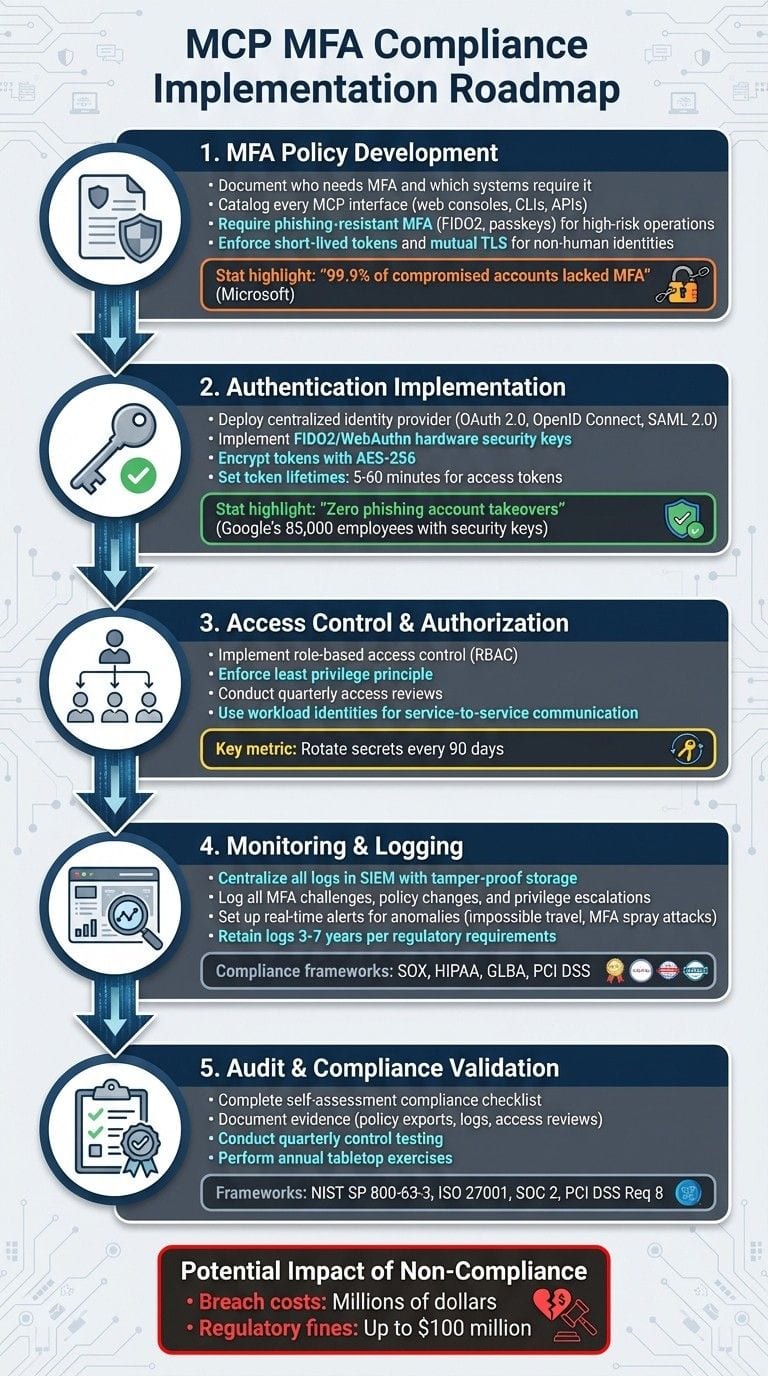
{MCP MFA Compliance Implementation Roadmap: 5 Essential Steps}
How to Design Secure MCP Deployments
MFA Policy Development and Enforcement
A written MFA policy is the backbone of secure access to MCP environments. According to NIST SP 800-63B and SP 800-53 Rev. 5, organizations are required to clearly document who needs MFA, which systems it applies to, and under what conditions. Without a formalized policy, authentication across MCP systems becomes inconsistent and difficult to audit.
Your policy should address every MCP access point, including web consoles, command-line interfaces, APIs, and service-to-service calls. A great example of this is Microsoft's October 2024 MFA rollout, which sets a standard by defining scope, timelines, and exceptions clearly. For MCP environments, this means explicitly stating that all human users accessing MCP management planes must use MFA by default, no matter their network location. This clarity forms the basis for setting precise MFA requirements for each MCP interface.
Setting MCP-Specific MFA Requirements
Start by cataloging every MCP interface. Your policy should enforce MFA for all interactive human access to both administrative and runtime planes of MCP systems. For high-risk operations, stronger authentication methods are necessary. For example, require phishing-resistant MFA (such as FIDO2, passkeys, or certificate-based authentication) for actions like modifying routing rules, changing agent policies, disabling guardrails, or accessing production agent control planes. The importance of this is underscored by Microsoft’s finding that 99.9% of compromised accounts lacked MFA, making baseline protection an essential safeguard.
When it comes to non-human identities - like service principals, workload identities, and AI agents - traditional MFA methods like CAPTCHAs can interfere with automation. Instead, policies should enforce strong credentials such as short-lived tokens, mutual TLS, or key-based authentication. Shared passwords or long-lived secrets should be strictly prohibited. Tailor requirements to each identity type: for example, workforce users should always use MFA on MCP consoles, privileged administrators should pair MFA with device compliance checks, and service principals should follow workload identity policies with controls equivalent to Conditional Access.
Risk-based or adaptive MFA adds another layer of security by responding to specific triggers defined in your risk model. For instance, step-up MFA should be required for scenarios like new device logins, unexpected locations, impossible travel patterns, or privilege escalations within MCP systems. High-risk actions, such as modifying MCP configurations that affect regulated data or financial approvals, should mandate phishing-resistant MFA. To make policies actionable and auditable, include clear examples like, "Require FIDO2 for any operation connecting MCP agents to PCI-scoped systems". Once these requirements are established, governance structures must ensure enforcement and continuous monitoring.
Access Governance and Oversight
Effective governance begins with a well-defined role catalog for MCP environments, including roles like Administrator, Policy Manager, Agent Developer, Observer, and Auditor. Each role should have narrowly scoped permissions, with time-bound privilege elevation and standardized processes for onboarding new MCP tenants. This includes a checklist to verify MFA configuration, logging setup, and data access restrictions.
Document approved MCP platforms, versions, and integration boundaries, specifying the data sources, APIs, and downstream systems that MCP agents can access. Clearly outline any restrictions, such as banning experimental agents from writing directly to production databases.
For particularly sensitive MCP operations - like policy changes, configuring data connectors, or deploying agents - combine technical controls with procedural safeguards. Require step-up MFA for high-impact changes, mandate dual control or peer approvals for modifications to agent guardrails or compliance filters, and ensure all administrative actions are logged with immutable audit trails. Clearly define what constitutes "sensitive" operations with MCP-specific examples, and implement change management protocols like documented tickets and peer reviews. Tools like Prefactor can centralize this process, linking authenticated human actions (secured by MFA) to agent behavior. This creates the detailed logging necessary to address the accountability challenges of deploying AI agents at scale.
Implementing Authentication Mechanisms
To implement authentication effectively, start by building on your documented MFA (Multi-Factor Authentication) policy and governance framework. The first step is deploying the technical infrastructure that enforces this policy. A properly implemented MCP (Multi-Cloud Platform) MFA solution begins with a centralized identity provider that supports modern protocols like OAuth 2.0 and OpenID Connect for interactive sign-ins, and SAML 2.0 for legacy or federated applications. Ensure your environment uses TLS 1.2 or higher, employs hardened DNS, manages certificates properly, and secures network paths. On the client side, standardize modern operating systems and make sure MCP components can validate tokens using the identity provider's JWKS metadata over HTTPS. These foundational steps help minimize inconsistencies in implementation and create a solid base for any MFA rollout. Once the infrastructure is established, the focus can shift to deploying authentication methods that are resistant to phishing.
Securing Authentication with Strong Methods
To protect against phishing, prioritize methods that tie authenticators to devices or cryptographic keys. Some of the most reliable options include FIDO2/WebAuthn hardware security keys, device-bound passkeys, and modern authenticator apps that support push approvals with number-matching. These approaches are highly effective in preventing attacks like SIM swapping and phishing. Time-based one-time passwords (TOTP) generated locally by authenticator apps are a better option than SMS, as they avoid exposure to telecom network vulnerabilities. SMS and voice-based MFA should only be used as fallback methods, as they are increasingly discouraged by regulators and security guidelines due to their susceptibility to interception and social engineering.
For high-value accounts, such as MCP admin or gateway accounts, pairing hardware-backed FIDO2 security keys with a backup app-based factor is often the best practice.
Google's rollout of phishing-resistant security keys to over 85,000 employees resulted in zero successful phishing account takeovers, showcasing the effectiveness of these methods.
Token security is another critical aspect. Access tokens, refresh tokens, and MFA device secrets or recovery keys should never be stored in plaintext. MCP services must encrypt these artifacts at rest using AES-256 in a secure mode like GCM, with keys managed by a centralized Key Management System (KMS) or Hardware Security Module (HSM). Keys should be rotated regularly and immediately after any suspected compromise. Access to key material must be strictly role-based, with full audit logging of usage. In transit, ensure all MCP traffic adheres to robust security protocols, including strong cipher suites and HTTP security headers. Token lifetimes should be kept short - typically 5 to 60 minutes for access tokens - and refresh tokens should either not be stored or be stored securely in OS-protected key stores on servers, never in browser local storage. These measures collectively reduce the risk of token replay and limit potential damage if a breach occurs.
Integrating Centralized Identity Providers
With the infrastructure and secure authentication methods in place, the next step is to integrate centralized identity providers (IdPs) for unified access control. Start by registering MCP components - such as admin consoles, APIs, and gateways - as applications within the IdP. Define redirect URIs, scopes, and audience values for each application. Administrators can configure single sign-on (SSO) using OIDC or SAML protocols, linking MCP applications to enterprise directories for centralized role-based access control (RBAC) and MFA management. Use the conditional access policies or equivalent tools in the IdP to enforce MFA for MCP sign-ins, targeting specific applications and user groups. This integration streamlines RBAC enforcement and audit logging, strengthening compliance efforts.
For browser-based MCP consoles, implement PKCE (Proof Key for Code Exchange) to prevent code interception. Confidential MCP services should authenticate to the token endpoint using client secrets or mutual TLS. For non-interactive agents, rely on secure grant types like client credentials with workload identities instead of user passwords or long-lived API keys.
Continuous session validation helps protect against session hijacking while keeping user interruptions minimal. MCP environments can achieve this by using short-lived access tokens and periodically revalidating server-side session states with the IdP. For sensitive actions - such as changing MCP policies, registering new agents, or accessing critical data - implement step-up MFA, which prompts users for an additional authentication factor even within an active session. Adjust idle session timeouts and maximum session lifetimes based on risk levels: for admins, 15 to 30 minutes of idle time and 8 to 12 hours of total session time are recommended, while standard users can have slightly longer limits. IdP sign-out events should propagate to MCP via front-channel or back-channel logout mechanisms. If the IdP detects risk signals - such as high-risk sign-ins or impossible travel - MCP should invalidate tokens and require re-authentication to maintain a strong MFA posture throughout the session.
For organizations incorporating AI agents into MCP environments, platforms like Prefactor can centralize audit trails, linking authenticated human actions (secured by MFA) to AI agent behavior. This provides the visibility and compliance controls needed to move AI agents from testing to full production.
Access Control and Authorization
Building on strong authentication practices, access control and authorization ensure that users, administrators, and AI agents can only access the MCP resources they are permitted to use. A security-conscious approach begins with role-based access control (RBAC), enforces strict management of tokens and credentials, and applies the least privilege principle across all components. Recent examples, like Microsoft's phased enforcement of MFA for key administrative portals, highlight the importance of ensuring every role, token, and permission is auditable.
Role-Based Access Control (RBAC)
RBAC forms the backbone of access management in MCP environments. Define roles such as MCP admin, security admin, auditor, operator, and read-only, and assign only the permissions needed for each role to function effectively. Avoid granting individual permissions on an ad-hoc basis. Instead, assign users and service accounts to predefined roles, and implement a ticketed approval process for any role changes. In multi-tenant MCP setups, ensure resources and policies are either logically or physically separated for each tenant. This prevents unauthorized cross-tenant access, ensuring, for instance, that a user from Tenant A cannot inadvertently gain access to Tenant B without explicit agreements.
Administrative roles should be reserved for hardened accounts that enforce mandatory MFA and device compliance, managed through Conditional Access or similar identity provider (IdP) controls. Conduct periodic access reviews - at least quarterly - where managers and data owners confirm that role assignments for MCP consoles, APIs, and workspaces are still appropriate. Remove any unnecessary access immediately. For multi-tenant configurations, separate test environments from production environments, and explicitly restrict non-production users from accessing production MCP agents or data.
For organizations deploying AI agents through MCP, establish a unified access model that tracks and manages permissions for both human users and AI agents. This ensures consistency and scalability across all services by defining access logic once, reducing the need for manual adjustments.
Token and Credential Management
Managing tokens and credentials properly is critical to preventing unauthorized access and maintaining security standards. Ensure that access tokens for MCP APIs have short lifespans - typically between 5 and 60 minutes - and grant only the permissions necessary for their intended purpose. Refresh tokens should follow strict rotation and revocation policies. Store all secrets securely using vaults like HSMs or cloud key vaults, and automate their rotation every 90 days or immediately if a compromise is suspected. Regularly scan for leaked secrets and document remediation actions.
Service-to-service MCP communication should use TLS 1.2 or higher and rely on certificates and signed requests to prevent token theft and replay attacks. Replace user-based service accounts with workload identities or managed identities whenever possible, applying policies specifically tailored to service principals instead of user-based Conditional Access policies. Ensure you can quickly revoke tokens and credentials when necessary, and validate that revocation propagates across all integrated MCP services. Conduct annual token-revocation exercises to assess readiness and document the results.
For AI agents, assign dedicated identities through dynamic client registration, keeping them separate from human users. Integrate MCP authentication with trusted identity providers like Auth0, Okta, Firebase, or Clerk to take advantage of their secure token and credential management features. Define agent access policies as code, deploying them through CI/CD pipelines to ensure version control, automated testing, and reduced risk of misconfigurations.
With tokens and credentials secured, the next step is to enforce strict access rights based on necessity.
Enforcing Least Privilege Access
The principle of least privilege ensures that every user, service, and agent has only the minimum access needed to perform their tasks. Begin by documenting baseline access models for each MCP component and AI agent, then adjust default settings to restrict permissions to the bare minimum. Ensure MCP agents and tools can only access the datasets, indices, and APIs they require. For example, separate collections for PII and non-PII data, and avoid granting broad wildcard access to internal systems.
Create distinct roles and agents for development, testing, and production environments. Limit write access in production to a small, well-justified group, and block test agents from accessing production systems. Any privilege escalation should require approval, step-up MFA, and comprehensive audit logging. Conduct quarterly access reviews to eliminate orphaned accounts, unused roles, and excessive permissions.
When setting up Conditional Access policies, include all users and resources. Under Grant controls, select "Require one of: multifactor authentication, device marked as compliant, Microsoft Entra hybrid joined device". Exclude specific apps only when absolutely necessary, and test policies in report-only mode before fully enforcing them. For RBAC, configure policies to exclude service principals and replace user-based service accounts with managed identities for automated access.
For AI agents, use tools like Prefactor to enforce constrained scopes and guardrails. Prefactor provides detailed oversight, ensuring agents cannot self-grant privileges. It also offers enterprise-grade governance for AI agents in production, with real-time visibility, audit trails, and compliance controls. This allows organizations to confidently transition AI agents from testing to full-scale production deployment.
Monitoring, Logging, and Compliance Validation
Once you've established MFA and access controls, the next step is ensuring these measures remain effective through robust logging and monitoring. U.S. regulations like SOX, HIPAA, and GLBA require organizations to clearly document who accessed what, when, from where, and using which authentication methods. Without centralized logging and real-time monitoring, it becomes nearly impossible to spot breaches or identify policy violations.
To stay compliant, make sure all authentication events are logged, including MFA challenges (with details on method and outcome), changes to MFA policies, privilege escalations, and failed policy evaluations. Logs should capture key details such as user or service identity, device ID, source IP/geolocation, UTC timestamp, accessed MCP resource, MFA method, risk score, policy ID/outcome, and a correlation ID. Store these logs in a centralized location using a SIEM solution with tamper-proof storage like append-only or write-once configurations. Enforce role-based access to prevent unauthorized log modifications. Retain logs in accordance with regulatory requirements - typically three to seven years for critical systems - and test log integrity and backup restoration at least once a year. These logs are essential for building detailed audit trails and enabling proactive anomaly detection.
Setting Up Audit Trails
Centralizing all MCP and identity provider logs in a secure repository is key. Configure your MCP gateways, identity providers, and applications to forward logs in near real-time, ensuring time synchronization across systems via NTP. For high-value log streams, such as admin MFA events, use cryptographic hashing or WORM storage. It's also important to separate duties - those managing the logs should not be the same individuals reviewing them for security incidents.
AI agents and service accounts should have dedicated identities, and their authentication events must be logged with the same rigor as human users. This includes tracking every MCP tool invocation, token issuance, and policy decision. Platforms like Prefactor can provide detailed audit trails, offering full visibility into agent actions - what was done, when, and why. This level of detail is critical for proving to auditors that your MCP environment enforces MFA-equivalent controls for both human and machine identities.
Clearly document your retention policies and align them with relevant regulations. For instance, PCI DSS v4.0 mandates at least one year of log retention, with three months readily accessible for analysis, while SOX-critical systems often require retention periods of seven years or longer. Regularly verify that disabled or deleted accounts cannot alter historical logs, and conduct annual token-revocation exercises to confirm your logging and revocation processes are functioning as intended.
Real-Time Monitoring for Anomalies
While audit trails help document past events, real-time monitoring is essential for catching anomalies as they happen. It can identify issues like "impossible travel" (logins from geographically distant locations in a short time), MFA spray attacks (multiple failed attempts from one IP targeting various accounts), sudden changes in MFA methods followed by privileged actions, or interactive logins by service accounts that shouldn't authenticate interactively.
Set up SIEM dashboards focused on MFA-specific metrics, such as failed attempts, bypass events, high-risk sign-ins, and unexpected authentications. Define alert thresholds based on your baseline - for example, flagging a 200% spike in failed MFA attempts within 24 hours at a specific MCP gateway or detecting an unusually high number of MFA methods registered to a single account in a short period. Use risk-based conditional access to automatically enforce step-up MFA or block sign-ins when high-risk conditions are detected.
SIEM correlation rules can help identify patterns of concern. For instance, compare consecutive login events by geo-IP and timestamp, aggregate failures by source IP and user, or flag configuration changes followed by privileged actions. Alerts should also be triggered if a service account appears in interactive MFA prompts or originates from unusual hosts. To streamline responses, integrate your SIEM with a SOAR platform to automate actions like blocking risky sessions, requiring additional MFA, or creating investigation tickets. If your environment relies heavily on AI agents, tools like Prefactor can centralize visibility and governance, ensuring any misbehaving agents are identified and contained quickly.
Lastly, schedule regular compliance validation activities. These should include monthly or quarterly control testing to confirm MCP MFA is enforced across all applications and tools, monthly log sampling to verify log completeness and integrity, and quarterly reviews of user and admin access for MCP-related roles. Conduct at least one annual tabletop exercise simulating scenarios like MFA failures or account compromises. For highly regulated or critical systems, increase the frequency to monthly control checks and weekly reviews of high-risk MFA exceptions. Maintain audit-ready evidence, such as screenshots of MFA policies, SIEM reports, raw log samples, and documented review procedures, to demonstrate that your controls are continuously operational and that any exceptions were pre-approved, time-limited, and fully logged.
Technical Hardening and Incident Response
With proper logging and monitoring in place, the next step is to strengthen MCP gateways and establish incident response plans. These measures help minimize vulnerabilities and ensure a quick, effective reaction to any incidents, all while aligning technical controls with MCP MFA compliance requirements.
Hardening MCP Gateways
Securing MCP gateways requires a multi-layered approach:
- Network level: Restrict access to approved IP ranges and private networks, enforce TLS 1.2+ with modern ciphers, and deploy web application firewalls (WAFs) on Internet-facing endpoints.
- System level: Apply CIS benchmarks to operating systems, disable unused services and ports, enforce disk encryption, and deploy endpoint detection and response (EDR) tools.
- Identity layer: Implement phishing-resistant MFA (e.g., FIDO2 passkeys or certificate-based authentication) and ensure device compliance checks for all gateway administrators.
- Application layer: Secure admin consoles with single sign-on (SSO), short-lived tokens, and rate limiting for authentication endpoints.
Establish a "golden baseline" for MCP gateways, covering configurations like operating systems, TLS settings, logging, and permissions. Store this baseline in version-controlled infrastructure-as-code. Any deployment or change should go through a change-management process, including peer reviews, approvals, and automated validation checks. Use continuous monitoring tools to detect configuration drift and either auto-remediate or flag issues for manual review. Schedule regular patch updates - monthly for standard patches and expedited for critical vulnerabilities - with clear rollback plans and maintenance windows aligned to U.S. time zones. Audit evidence should include configuration snapshots, change tickets, and testing results that confirm hardening measures (e.g., MFA enforcement, logging, and role-based access control) are consistently applied.
For organizations using AI agents across MCP gateways, Prefactor offers additional security by centralizing audit trails and enforcing policy-as-code. Prefactor ensures every AI agent operates with a secure, autonomous identity and enforces access policies in real time. It generates detailed audit trails that show which agent accessed which MCP tool, when, and under what conditions - essential for demonstrating compliance with MFA-equivalent controls for both human and machine identities. Prefactor's integration with CI/CD pipelines ensures that agent authentication and authorization are versioned, testable, and reviewable, just like other infrastructure components. This setup is critical for securely moving AI agents from testing to production while maintaining compliance and operational oversight.
Establishing Incident Response Plans
Once defenses are in place, it's crucial to prepare structured response plans to handle potential breaches effectively. These plans are key to maintaining MCP MFA compliance and meeting audit requirements.
A well-designed incident response plan for MCP environments should outline incident categories and severities - such as account compromise, unauthorized agent activity, or gateway misconfiguration - and include detailed playbooks for each scenario. These playbooks should define immediate containment steps (e.g., revoking tokens, disabling accounts, rotating keys, or blocking endpoints), assign roles (e.g., incident lead, MCP owner, IAM engineer, legal/compliance), and establish SLAs for triage, containment, and resolution. Use MCP logs and tools like Prefactor audit trails to reconstruct events and ensure clear communication protocols for notifying affected stakeholders, regulators, or customers in the U.S., when necessary.
Incident response teams should operate in tiers:
- Tier 1 (NOC/SOC): Handles initial triage and containment.
- Tier 2 (MCP/IAM specialists): Conducts root cause analysis and remediation.
- Tier 3 (security leadership, legal, compliance): Manages critical decisions, such as notifications or potential system shutdowns.
Set clear escalation criteria, such as confirmed privileged account compromise, evidence of data exfiltration, or repeated MFA failures from unusual locations. Maintain updated contact lists and on-call rotations aligned with U.S. time zones. Pre-authorize specific containment actions (e.g., forced token revocation or emergency account locking) at lower tiers to avoid delays, and ensure all actions are logged for post-incident reviews.
Conduct post-incident reviews within five business days. Document the timeline, root cause, control gaps, and behavior patterns, and assign remediation tasks with clear deadlines. These reviews should result in actionable improvements, such as tightening Conditional Access rules, enhancing MFA methods, hardening gateway policies, or updating Prefactor settings. Track remediation efforts in a risk register and monitor metrics like mean time to detect (MTTD), mean time to respond (MTTR), and recurrence rates to show continuous improvement. Test the incident response plan at least once a year with tabletop exercises simulating scenarios like MFA failures, account breaches, or rogue agent activity.
Compliance Audit and Reporting
Once you've tested your incident response plans, the next step is ensuring that every MCP MFA control is properly documented, measurable, and audit-ready. Building on the MFA controls and logging practices already in place, this phase transforms technical configurations into audit evidence that aligns with frameworks such as NIST SP 800-63-3, ISO/IEC 27001, SOC 2, HIPAA Security Rule, or PCI DSS requirement 8. The objective is straightforward: demonstrate that MFA is consistently enforced, monitored, and governed across all MCP access points.
Self-Assessment Compliance Checklist
A solid self-assessment checklist links each MFA control to specific regulatory requirements. For every MCP gateway, API, and admin interface, consider these key questions:
- Is MFA mandatory for all interactive human access?
- Are privileged roles protected by MFA without exceptions?
- Is MFA enforced for remote and cross-tenant access?
- Are non-interactive identities secured through alternative measures?
Each question should require concrete evidence, such as policy exports, screenshots, or code snippets, to prove that the control is in place and functioning.
Your checklist might include items like:
- "All MCP admin and operator accounts require phishing-resistant MFA."
- "All end-user MCP access requires MFA, except for documented, risk-accepted exceptions."
- "Conditional or policy-based access steps up to MFA for risky sign-ins or sensitive actions."
- "Test and development MCP environments follow the same MFA requirements as production."
- "A quarterly review process is documented for MFA exclusions, emergency accounts, and conditional rules."
Each checklist item should have a yes/no answer, a risk rating, the name of the remediation owner, and a target completion date formatted as MM/DD/YYYY. Include columns for "Control ID / Framework," "Evidence Location," and "Control Owner" to help auditors quickly map MCP MFA controls to specific regulatory standards.
To show active monitoring rather than static configuration, set up your SIEM or monitoring platform to alert on issues such as repeated MFA failures, patterns indicating MFA fatigue attacks (e.g., multiple prompts in a short time), sign-ins with impossible travel characteristics, changes to MFA or conditional access policies, and new MFA exemptions. Compliance reports should highlight key metrics like the monthly MFA failure rate, the number of blocked high-risk sign-ins, and the average time to respond to MFA-related alerts. Tracking these trends and corrective actions over time demonstrates to auditors that MFA is continuously monitored and not a "set-it-and-forget-it" measure.
Documenting Evidence for Audits
After completing your self-assessment, compile the necessary audit evidence to prove compliance. This evidence might include:
- Exports or screenshots of MFA and conditional access policies.
- Configuration files or infrastructure-as-code snippets defining MCP gateway MFA requirements.
- Authentication logs showing successful and failed MFA attempts.
- Reports from periodic access reviews and MFA exemption evaluations.
- Documented MFA enrollment procedures.
- Incident records related to MFA events.
Organize this evidence in a structured repository, such as a folder named "/Audit/MFA/2025", using a consistent naming system. Maintain a register that lists each control, its corresponding evidence file, the last update date (MM/DD/YYYY), and the control owner.
Ensure that system logs include key details like user ID, source IP, UTC timestamp, authentication method, success/failure status, and policy change records. Centralize these logs in your SIEM, use a standardized schema, and retain them for periods aligned with applicable regulations (commonly one to seven years in the U.S.). Protect logs with write-once storage or immutability features, and document retention policies in a signed "MFA Log Retention Policy" PDF. This document should outline the log types covered, retention duration, storage location and protections (e.g., encryption, access controls), and disposal procedures.
If your organization uses AI agents or automated workflows to manage MCP access and MFA policies, tools like Prefactor can provide detailed audit trails. These trails show which agents made policy changes, when they occurred, and the human approvals involved - ensuring accountability and operational oversight for AI-driven adjustments in the MFA environment.
Conclusion
Maintaining MCP MFA compliance requires a steadfast focus on strong policies, secure authentication methods, least-privilege access, continuous monitoring, and audit-ready documentation. This checklist aligns with key U.S. regulatory standards such as NIST, SOC 2, HIPAA, GLBA, and PCI DSS. Microsoft's implementation of mandatory MFA across the Azure portal, Entra admin center, and other critical services highlights an industry-wide trend: postponing MFA for high-value services significantly heightens risk, as these accounts are prime targets.
Effective MCP MFA hinges on centralized identity enforcement, leveraging Conditional Access to enforce phishing-resistant MFA for administrators, step-up authentication for risky sign-ins, and seamless integration with device compliance and risk signals. By combining robust authentication, role-based access control (RBAC), and least-privilege principles, organizations can minimize exposure even if credentials are compromised. Comprehensive logging - tracking successful and failed MFA attempts, policy changes, token issuance, and access to sensitive MCP resources - feeds into your SIEM, ensuring continuous monitoring and providing essential evidence for audits.
For AI agent environments, Prefactor simplifies governance by connecting authenticated human actions to agent behavior and enforcing consistent MFA policies across both human and automated workflows. This centralized approach ensures compliance with MFA and least-privilege requirements for all actors, reinforcing accountability and operational oversight as AI agents transition from experimental stages to full-scale production.
To solidify these controls, conduct a thorough gap analysis, address high-risk areas, refine identity and Conditional Access policies, integrate MCP logs into your SIEM, and document all measures for ongoing review. Security leaders increasingly recognize MFA and context-aware access for critical control planes like MCP as key board-level concerns. These control planes oversee high-value operations, sensitive data flows, and AI-driven processes, making robust MFA, least-privilege access, and clear audit trails indispensable for reducing risks and mitigating potential impacts.
FAQs
What should an effective MFA policy include for MCP environments?
An effective multi-factor authentication (MFA) policy for MCP environments should prioritize strong security measures while ensuring smooth integration. Here are the key elements to consider:
- Incorporate varied authentication methods such as MFA, single sign-on (SSO), passkeys, magic links, and social logins to provide both flexibility and enhanced security.
- Use dynamic client registration to differentiate between human users and automated agents effectively.
- Ensure compatibility with established identity platforms like Auth0, Okta, or Firebase to simplify operations.
- Implement role-based access control (RBAC) with features like delegated access and attribute-based permissions for better user management.
- Manage policies as code through CI/CD pipelines to facilitate version control and thorough testing.
- Maintain detailed audit trails to monitor all agent activities and reinforce accountability.
- Enable context-aware access controls to secure operations across large-scale environments.
By integrating these components, organizations can align with industry standards while safeguarding their MCP environments and ensuring operational efficiency.
What steps can organizations take to implement phishing-resistant MFA?
To strengthen security with phishing-resistant MFA, organizations should focus on hardware-based authentication methods like security keys or passkeys. These options offer a higher level of protection compared to static codes or SMS-based MFA. It's also important to ensure your MFA solution supports phishing-resistant protocols like FIDO2, which are designed to counter modern threats.
Equally important is ongoing user education to raise awareness about phishing tactics. Pair this with continuous monitoring to quickly identify and address suspicious activity. When combined with strong governance and compliance measures, these steps create a more secure and dependable authentication framework.
What are the best practices for managing AI agent identities in MCP systems?
To manage AI agent identities in MCP systems effectively, start with dynamic registration to securely assign identities to non-human agents. Pair this with trusted identity solutions like OAuth or OIDC for smoother authentication and access management processes.
Use policy-as-code to create and enforce consistent access controls. Incorporate delegated authentication methods such as SSO and MFA to enhance security. Additionally, maintain detailed audit trails to ensure visibility and accountability, supporting secure, scalable, and compliant operations for your AI agents.