Audit trails in CI/CD pipelines are essential when deploying AI agents, especially in regulated industries like healthcare and finance. They ensure traceability by logging who did what, when, and why at every stage, from code commits to runtime decisions. Without proper logging, organizations face risks like non-compliance, lack of transparency, and operational vulnerabilities. Here's what you need to know:
- Unique Identifiers: Assign immutable IDs to every build, deployment, and AI agent action for clear tracking.
- Centralized Logging: Use tools like ELK Stack or Splunk to aggregate logs securely in tamper-proof storage.
- Synchronized Timestamps: Ensure all systems use accurate, aligned timestamps to maintain event sequences.
- Lifecycle Logging: Record pipeline runs, deployments, access changes, and runtime activities with detailed metadata.
- Compliance Mapping: Link audit logs to frameworks like SOC 2, HIPAA, or PCI DSS for regulatory alignment.
- Testing and Monitoring: Regularly validate log completeness, schema accuracy, and retention policies.
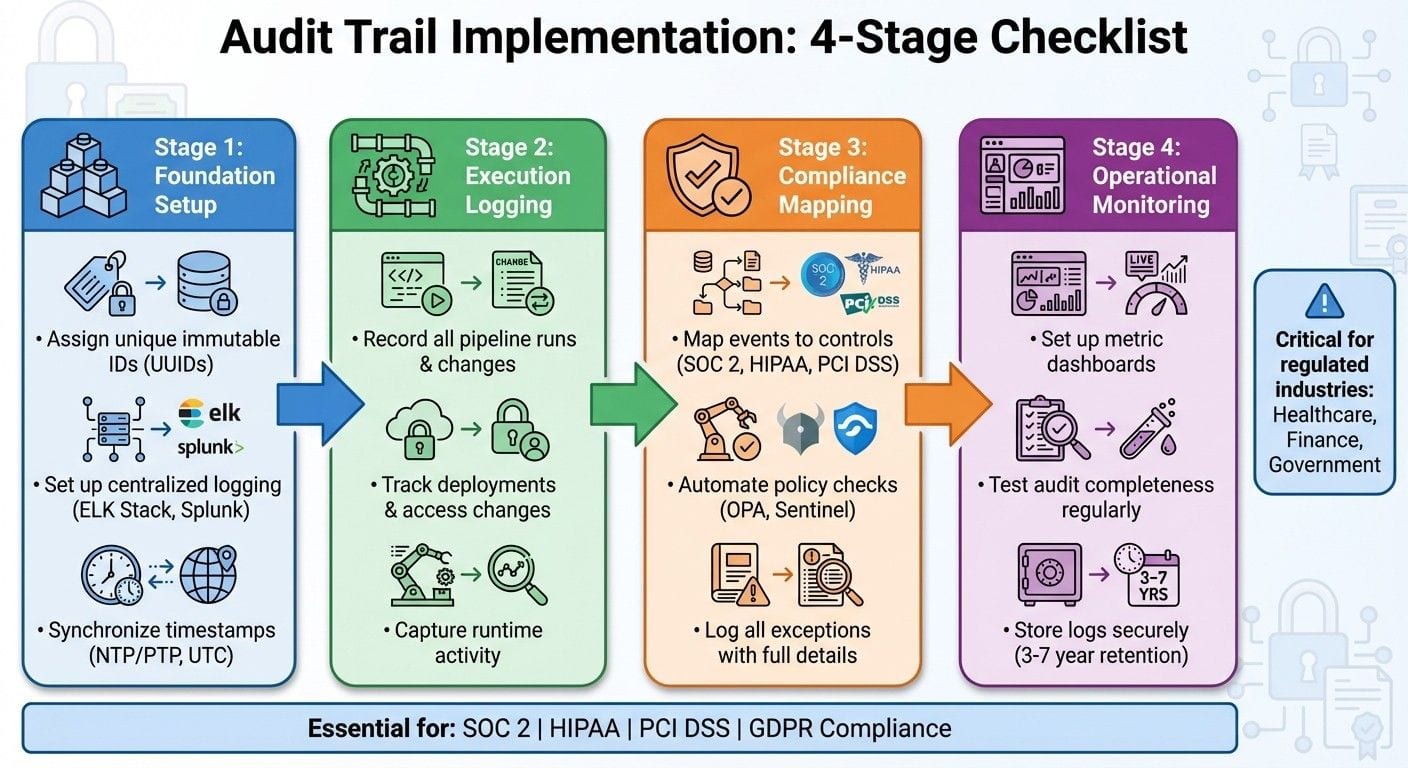
{CI/CD Audit Trail Implementation: 4-Stage Checklist for AI Agent Compliance}
GitLab CI/CD & Kosli: Automate DevSecOps Compliance & Audit Trails
Foundation Checklist: Setting Up CI/CD Pipelines for Audit Trails
Getting your CI/CD pipeline ready for audit trails starts with building a solid infrastructure. A well-structured pipeline ensures you can track every action reliably. Here are three essential steps to create a foundation that connects the initial setup with the detailed execution and compliance processes. This is the same pipeline a continuous integration agent runs its evaluation gates in, so the audit trail and the eval record can share the same logging infrastructure.
Assign Unique Identifiers to Every Component
To maintain a clear and traceable record, assign a unique identifier to every build, deployment, AI agent instance, and access event. This could be something like a UUID or a sequential build number, such as build-12-16-2025-001. The most important factor is immutability - once an ID is assigned, it should never change. This is especially important for SOC 2 compliance, where auditors need an exact, gap-free sequence of events to verify processes.
Extend this practice to AI agents by tagging their models, prompts, and inference runs with unique IDs. Configure your CI/CD tools - like Jenkins, GitHub Actions, or GitLab CI - to automatically generate these immutable IDs and metadata tags.
Some platforms, like Prefactor, go even further by assigning secure, autonomous identities to AI agents. This separation of human and agent identities ensures your logs clearly show who (or what) performed each action, leaving no room for ambiguity.
Set Up Centralized and Secure Logging
Scattered logs can create blind spots, making it hard to track activities accurately. Instead, funnel all pipeline events into a centralized logging system. Tools like the ELK Stack (Elasticsearch, Logstash, Kibana), Splunk, or Prometheus with Grafana are excellent options. To ensure integrity, logs should be stored in immutable formats, such as write-once-read-many (WORM) storage, which prevents tampering.
Security is just as critical as centralization. Encrypt logs both in transit and at rest, and enforce role-based access controls to limit who can view sensitive audit data. For AI agents, use tools that provide real-time visibility and detailed audit trails. For instance, in GitLab CI, you can pipe logs to Elasticsearch in JSON format, including unique IDs. This enables you to connect traces across the pipeline, from build to deployment.
Synchronize Timestamps Across All Systems
Logs from distributed systems - such as CI/CD nodes, agent hosts, and logging servers - can quickly become unreliable if timestamps are out of sync. Even small timing discrepancies can make it hard to reconstruct the order of events. Use NTP (Network Time Protocol) or PTP (Precision Time Protocol) to synchronize all systems to within milliseconds. Configure everything to use the UTC timezone to eliminate any potential confusion.
Point all pipeline runners, such as Kubernetes pods, AI agent hosts, and log aggregators, to reliable NTP servers like pool.ntp.org. In cloud environments, services like AWS Time Sync Service can help ensure precision. Regularly validate synchronization by testing event timestamps for alignment. Tools like chrony are useful for monitoring time drift and keeping it within a margin of 100 milliseconds.
Execution Checklist: What to Log at Each Stage of the AI Agent Lifecycle
Once you've established a solid foundation, the next step is determining exactly what to log as your AI agents progress from development to production. Missing even one critical event can lead to gaps auditors will flag and make incident reconstruction nearly impossible. This checklist outlines the essential events to track at every stage of the agent lifecycle, ensuring your logs provide complete visibility.
Record All Pipeline Runs and Changes
Every pipeline run that interacts with an AI agent must be fully documented. Key fields to log include:
- Unique pipeline/run ID
- Commit hash
- Branch name
- Triggering event (manual, scheduled, or webhook)
- Environment (development, staging, or production)
- UTC timestamp
- Initiator/approver details (user ID, role, identity provider)
- CI/CD tool or service account used
- Executed stages with start and end times
For AI agents, make sure to also log the model version, policy version, and configuration version tied to each run. Use normalized JSON records with consistent keys (e.g., pipeline_id, agent_id, trigger_type, approver_id) to make event correlation and querying easier. This setup allows you to quickly answer questions like, "Which pipeline run deployed the agent that's now acting up?"
Log every change that could affect agent behavior, including updates to code, configuration, and policies. For each change, capture details such as IDs, before/after values, justification, reviewer/approver information, and control links. In regulated environments like SOC 2 or HIPAA, include additional fields like ticket or incident links, risk classification (low, medium, high), and references to affected control IDs.
Track Deployments and Access Changes
After logging pipeline runs, focus on deployments and access changes that impact agent behavior. For deployments, log details such as:
- Environment and target infrastructure (e.g., cluster, region, node group)
- Deployment strategy (rolling, blue-green, canary) and rollout percentage for partial deployments
- Artifacts deployed (e.g., container image digest, model artifact checksum, policy/config bundle version)
- Links to the originating pipeline run and change requests
Record all promotion gates passed (tests, security scans, manual approvals) with pass/fail statuses, approver identities, and timestamps. This creates an auditable chain from commit to production behavior.
Emergency overrides and manual changes require special attention. Log these as emergency_override with details like the reason, risk level, authorization path, executor/approver identities, bypassed checks, and impact scope. Flag these logs for heightened review with fields like requires_postmortem: true and link them to follow-up tickets or post-incident reports. This ensures auditors can see that non-standard actions are controlled and reviewed.
Access-related events are equally critical. Log identity lifecycle events such as role assignments/revocations, group membership changes, API key/service account creation or rotation, and updates to role-based access control (RBAC) or policy bindings affecting AI agents. Include actor identity (who made the change), subject identity (whose access changed), old and new roles/permissions, approval paths, and timestamps. For agents acting as principals, document resource access changes (e.g., databases, APIs, secret stores) to answer questions like, "Who gave this agent access to this system, and when?"
Capture Runtime Activity
Runtime activity logs provide the final layer of lifecycle traceability. Key events to capture include:
- Inbound requests: caller ID, tenant/user context, input type, size, and classification
- Outbound API calls: target system, operation, request/response status, latency
- Data access events: datasets, tables, or objects accessed, with sensitivity labels
- Model invocations: model ID, version, parameters (e.g., temperature, max tokens), latency
- Outcomes: chosen actions, workflow paths, or policy decision results
- Distributed tracing identifiers: trace IDs and span IDs for end-to-end correlation
Use techniques like field-level masking, tokenization, and data minimization to meet privacy requirements such as HIPAA or GDPR.
To enable end-to-end traceability, include stable identifiers in all logs: agent_id, agent_instance_id, pipeline_run_id, deployment_id, and model_version_id. Ensure your CI/CD system injects these IDs into environment variables or config files, and your agent runtime appends them to every log entry and trace. Platforms like Prefactor can help correlate these identifiers into unified audit timelines, giving you full visibility into actions and their origins.
Monitor key metrics and thresholds to assess the health and completeness of your audit trails. Aim for near-perfect coverage of pipeline runs, deployments with linked approvals, and runtime requests containing agent and deployment identifiers. Track error rates in logging (e.g., dropped events, schema validation issues), average time to reconstruct incident timelines (goal: minutes, not hours), and the number of unaudited manual interventions (target: zero for production). For U.S.-based enterprises, align these thresholds with internal risk tolerances and frameworks like SOC 2. Regularly test your systems with simulated incidents and audits to ensure readiness.
Compliance Checklist: Meeting Regulatory Requirements with Audit Trails
Mapping audit logs to compliance controls is a critical step in ensuring your organization passes audits and meets regulatory standards. By using detailed audit trails from your CI/CD pipeline, you can align and automate compliance controls to satisfy frameworks like SOC 2, HIPAA, and PCI DSS. These frameworks require clear evidence that your systems are tracking the right events in the right way. This checklist outlines how to map audit trails to compliance requirements, automate checks, and document exceptions effectively.
Map Logged Events to Compliance Controls
Start by creating a traceability matrix that links each logged event in your CI/CD pipeline to specific compliance control objectives. Use unique identifiers to connect logs with the compliance requirements of frameworks like SOC 2, PCI DSS, and HIPAA. For instance:
- SOC 2: Requires mapping user actions with timestamps to control CC6.1 (logical access controls).
- PCI DSS: Mandates recording all access attempts with user IDs and timestamps under requirement 10.2.
- HIPAA: §164.312 requires detailed logs of all modifications to protected health information (PHI).
Tagging log entries with control IDs in your centralized logging system is key. For example, if a pipeline run deploys an AI agent that handles PHI, it should be tagged with identifiers for SOC 2 logical access, change management, and HIPAA compliance.
For AI-specific scenarios, ensure your logs capture critical details like model training runs, version deployments, and policy updates. When auditors ask questions like, "How do you ensure only authorized agents access sensitive data?" you can point to logs showing role-based access control enforcement, access grants with approver details, and runtime access attempts - all mapped to the relevant compliance framework.
This precise mapping prepares the foundation for automating compliance validation in later pipeline stages.
Automate Policy Checks and Log Results
Once events are mapped, integrate automated policy checks to enforce controls throughout your CI/CD pipeline. Tools like Open Policy Agent (OPA), Sentinel, or Conftest allow you to define policies in YAML or Rego that encode requirements such as:
- Mandating two-person approval for production deployments.
- Blocking unauthorized database access.
- Requiring a security review for model changes.
Embed these checks into your pipeline using platforms like GitHub Actions, Jenkins plugins, or GitLab CI. Every policy evaluation should be logged with detailed information, including:
- Policy name and version.
- Check result (pass/fail) and any violation reason.
- Actor identity and timestamp.
Feed these logs into an immutable audit store alongside deployment and runtime logs. By integrating compliance checks early in the pipeline, you can catch issues before they reach production, reducing the risk of costly violations.
Failed policy checks should block deployments and trigger alerts to the responsible team. This process creates an auditable trail that demonstrates your controls are functioning as intended. Tools like Prefactor can integrate these checks into AI agent governance workflows, offering real-time visibility and automated validation across your AI systems.
Log All Exceptions with Full Details
High-risk events like emergency deployments, temporary access grants, and policy waivers require meticulous documentation, as auditors often scrutinize these closely. For example, SOC 2 mandates monitoring of bypassed controls. Each exception should include:
- Exception type and bypassed controls.
- Risk classification and risk assessment.
- Approver ID, role, and timestamp.
- Expiration date and linked follow-up actions.
In AI-related cases, this includes logging manual overrides of an agent’s behavior outside normal procedures. Every exception should link to a follow-up ticket or post-incident report, allowing auditors to verify that non-standard actions are reviewed and corrected.
Store these logs with heightened retention and access controls, flagging them for mandatory review during audits. For SOC 2, firms that log emergency changes and manual deployments with full approver details showcase robust control monitoring, even under pressure. According to Wipfli's SOC 2 guidance, immutable logs with complete context help mitigate risks associated with rapid CI/CD cycles.
Ensure retention periods meet regulatory requirements. For example:
- SOC 2: Typically requires one year of logs.
- HIPAA: Mandates six years for PHI-related events.
Use secure storage solutions like AWS S3 with object lock or Azure immutable blob storage to prevent tampering. Monitor metrics such as log completeness, the time required to reconstruct incident timelines (aiming for minutes, not hours), and the number of unaudited manual interventions (targeting zero in production environments). This ensures your compliance efforts remain thorough and audit-ready.
Operational Checklist: Monitoring and Maintaining Audit Trails
Operational monitoring is essential for keeping your audit trails complete and secure. While foundational, execution, and compliance checklists set the stage, ongoing monitoring ensures logs don’t degrade over time. Without regular oversight, issues like storage limits, missing data, or unnoticed critical events can arise - often only discovered during an audit or incident review. By implementing these operational practices, you can maintain audit readiness at all times.
Set Up Dashboards to Track Audit Metrics
Dashboards are invaluable for real-time monitoring of key audit metrics. Focus on these four categories:
- Pipeline execution: Keep tabs on run counts, success/failure rates, durations, rollback frequency, and failed policy checks.
- Change and deployment: Monitor deployment counts by environment, lead times from commit to production, emergency change frequency, and approval delays.
- Audit coverage: Track the percentage of logged pipeline steps, production events tied to commits or build IDs, and unattributed runtime events.
- Security and anomaly: Watch for unusual access patterns, pipeline definition changes, authentication failures, error spikes, and policy violations.
Set alerts for threshold breaches so your team can respond quickly. Tailor dashboards to specific roles: engineering teams need to see pipeline health, security teams focus on anomalies, compliance teams check evidentiary completeness, and SRE teams monitor runtime agent behavior for incident correlation. Tools like Grafana, Prometheus, or Nagios are well-suited for tracking infrastructure and pipeline performance. For organizations managing AI agents at scale, Prefactor centralizes these metrics, offering unified dashboards for agent runs, actions, policy checks, and audit readiness.
Test Audit Completeness Regularly
Regular testing ensures your audit trails remain reliable and comprehensive. Here’s how to validate:
- Run synthetic exercises: Push a dummy change through the entire pipeline, deploy it to a test environment, and trace it backward using only logs and unique identifiers. This confirms end-to-end traceability.
- Execute automated smoke tests: Perform controlled pipeline executions and query the logging backend to verify all expected log types - commits, builds, tests, deployments, runtime actions, and policy checks - are captured.
- Validate log schema: Ensure required fields like timestamps, identity, pipeline ID, commit ID, environment, agent ID, action type, and outcome are present and non-null. Configure your CI process to fail builds if any fields are missing.
- Reconcile logs across systems: Compare logs from CI, deployment tools, and runtime platforms to detect gaps or inconsistencies.
Don’t forget to test uncommon workflows. Ensure failed builds log root-cause details, rollback actions generate clear entries, and emergency changes are documented even if standard approvals are bypassed. Also, test scenarios where CI/CD permissions or agent policies are changed to confirm before-and-after states are recorded. Prefactor simplifies this process with a single audit API and built-in consistency checks across fragmented toolchains.
Store Logs Securely for Required Retention Periods
Retention periods should align with regulatory, contractual, and business needs. Standards like SOC 2, PCI DSS, and HIPAA often require logs to be retained for three to seven years. For high-impact systems, internal risk assessments may recommend longer retention.
Store logs immutably with strong encryption, both in transit and at rest. Use storage tiers: hot storage for recent logs needed for immediate investigations and archival storage for older logs, with documented retrieval procedures. Regularly test your ability to retrieve historical logs to confirm retention policies and indexing meet audit requirements. Prefactor supports this with logically immutable audit trails and compliant storage policies.
To protect audit logs, enforce layered security controls. Implement least-privilege access so only designated roles can view sensitive logs, and ensure no single operator can modify or delete them. Segregate duties to prevent individuals who deploy or modify AI agent behavior from altering audit logs. This layered approach ensures your compliance efforts remain audit-ready.
Conclusion
Audit trails play a critical role in CI/CD pipelines, ensuring both accountability and compliance, especially when managing AI agents. The checklists outlined here serve as a practical guide to creating audit trails that align with regulatory standards like SOC 2, GDPR, and HIPAA. They also help facilitate quick incident responses and support ongoing improvements. However, building effective audit trails requires a well-integrated strategy to address potential challenges.
Manually implementing these practices across disconnected tools can be cumbersome. Tasks like synchronizing timestamps, maintaining immutable logs, and reconciling systems during emergency changes or rollbacks demand significant effort and precision.
This is where Prefactor steps in to streamline the process. It offers built-in audit trail solutions that automatically log key events like authentication, authorization, runtime actions, and policy violations. By treating agent access as code within your CI/CD workflows, Prefactor ensures all changes are versioned, testable, and reviewable. This transforms audit trails into a valuable operational resource while aligning with the checklist's recommendations for thorough and automated tracking.
Whether you choose custom solutions or specialized platforms, the key is to establish robust, immutable audit trails before deployment. Accountability is not something that can be retrofitted - it must be built into the foundation from the start.
FAQs
How do unique identifiers improve the accuracy of audit trails in CI/CD pipelines?
Unique identifiers are essential for keeping accurate audit trails in CI/CD pipelines. By assigning a distinct identifier to every interaction involving an AI agent, organizations can ensure that each action is meticulously tracked and linked to a specific entity or event. This creates a dependable, tamper-resistant record that boosts both visibility and traceability.
These identifiers simplify the process of identifying issues, confirming compliance, and maintaining accountability. They also strengthen security by preventing unauthorized changes or inconsistencies in the logs - an absolute must when managing AI agents in production settings.
What are the advantages of using centralized logging systems for audit trails in CI/CD pipelines?
Centralized logging systems provide real-time insights into audit trails, helping organizations quickly spot irregularities, uphold compliance, and ensure accountability for AI agents. These systems simplify the process of gathering data, make searching and analyzing logs more straightforward, and strengthen security monitoring - key elements for handling intricate workflows effectively.
By bringing all logs together in one platform, teams can monitor changes, pinpoint problems, and prove adherence to regulatory requirements. At the same time, this approach enhances overall operational control of AI systems.
Why is it important to synchronize timestamps for accurate audit trails?
Synchronizing timestamps plays a key role in building reliable audit trails. It ensures that every action is recorded in the correct order and marked with the exact time it happened. This precision is crucial for maintaining compliance, ensuring security, and promoting accountability in the operations of AI agents.
When timestamps aren't properly synchronized, tracing events or verifying the integrity of interactions becomes challenging. This can create gaps in compliance or leave room for operational errors. Accurate time tracking provides organizations with the confidence to manage AI agents effectively while meeting regulatory standards.