
Real-time agent logging with MCP is a system for tracking every interaction an AI agent has, from receiving a request to providing a response. It uses structured JSON logs with correlation IDs to ensure traceability and visibility across all stages of an agent's workflow. This approach allows for monitoring, debugging, and compliance in multi-agent systems.
Key Highlights:
- What It Does: Logs agent activities, including tool names, parameters, execution time, responses, and errors.
- Why It Matters: Helps identify performance issues, track errors, and maintain audit trails for security and compliance.
- How It Works: Uses JSON-RPC to log across transport layers (HTTP, WebSocket, etc.) and integrates with tools like Splunk, Elasticsearch, and Grafana.
- Use Cases:
- Monitoring multi-agent systems.
- Debugging tool failures with correlation IDs.
- Maintaining secure and encrypted audit trails.
Setup Essentials:
- Requirements: MCP server, Prefactor for authentication, and an observability backend.
- Steps:
- Configure logging hooks in the MCP server.
- Integrate Prefactor for secure agent authentication and audit trails.
- Forward logs to observability platforms and create dashboards for monitoring.
Best Practices:
- Use structured JSON logs with encryption.
- Mask sensitive data and enforce role-based access controls.
- Optimize performance with sampling, batching, and retention policies.
This system ensures secure, efficient logging while supporting compliance and performance monitoring for AI deployments.
Prerequisites for Setting Up MCP Logging
Tools and Platforms You’ll Need
To get started, you'll require an MCP server equipped with logging capabilities, a Prefactor account for agent authentication, and an observability backend. Popular options for the backend include Splunk, Azure Monitor, Elasticsearch, Grafana Loki, or Tinybird. Your MCP server must support JSON-RPC and structured logging. It should declare "capabilities": {"logging": {}} during the protocol handshake, allowing clients to dynamically adjust log verbosity using logging/setLevel.
For structured logging, you’ll need a logging library that outputs JSON. Some great choices are Pino or Bunyan for Node.js, Loguru for Python, or structlog for other programming languages. If you’re building MCP-compatible servers, Stainless SDKs can help you generate these components directly from OpenAPI specs, ensuring consistent logging across different environments.
Configuring Prefactor for MCP Authentication
Prefactor simplifies agent authentication by integrating seamlessly with your existing OAuth/OIDC systems, such as Auth0, Okta, Firebase, or Clerk. Begin by signing up at prefactor.tech and linking it to your identity infrastructure. This setup ensures secure agent logins and delegated access while staying compatible with your current systems.
Within Prefactor, define agent-specific scopes to manage tool access for each agent. Use OAuth2 flows to generate session tokens and configure delegated access policies for multi-tenant setups. Prefactor also supports CI/CD-driven provisioning, which lets you version, test, and review authentication and authorization policies just like any other part of your infrastructure. Additionally, Prefactor provides agent-level audit trails, automatically logging authentication events. This feature is invaluable for correlating log entries with specific agent identities and sessions, aiding compliance efforts.
Once authentication is in place, you can move on to preparing your environment for real-time logging integration.
Preparing Your Environment
With secure agent access established through Prefactor, the next step is to configure your development and production environments for MCP logging. Start by installing any necessary MCP server dependencies - Node.js is commonly required if you’re using JavaScript-based SDKs. Then, integrate your OAuth/OIDC providers with Prefactor's authentication layer. Begin with local logging to validate your setup before creating forwarding pipelines to your chosen observability backend.
Your logging system should capture the following fields:
- Timestamp
- Log level (e.g., INFO, ERROR)
- Message text
- Correlation or trace ID
- Tool name
- Sanitized parameters
- Execution duration
- Outcome
Set up logging hooks at four key stages: when a request is received, before tool execution begins, after execution is completed, and when the response is sent back. Use TLS encryption for secure log transport, and configure role-based access controls on dashboards to limit visibility to teams like SRE, security, and data analytics. During development, enable detailed debug logs to assist with troubleshooting. In production, switch to info or warn levels and use sampling for high-volume events to manage costs and safeguard sensitive data.
How to monitor your MCP Server logs
Step-by-Step Guide to Real-Time Agent Logging
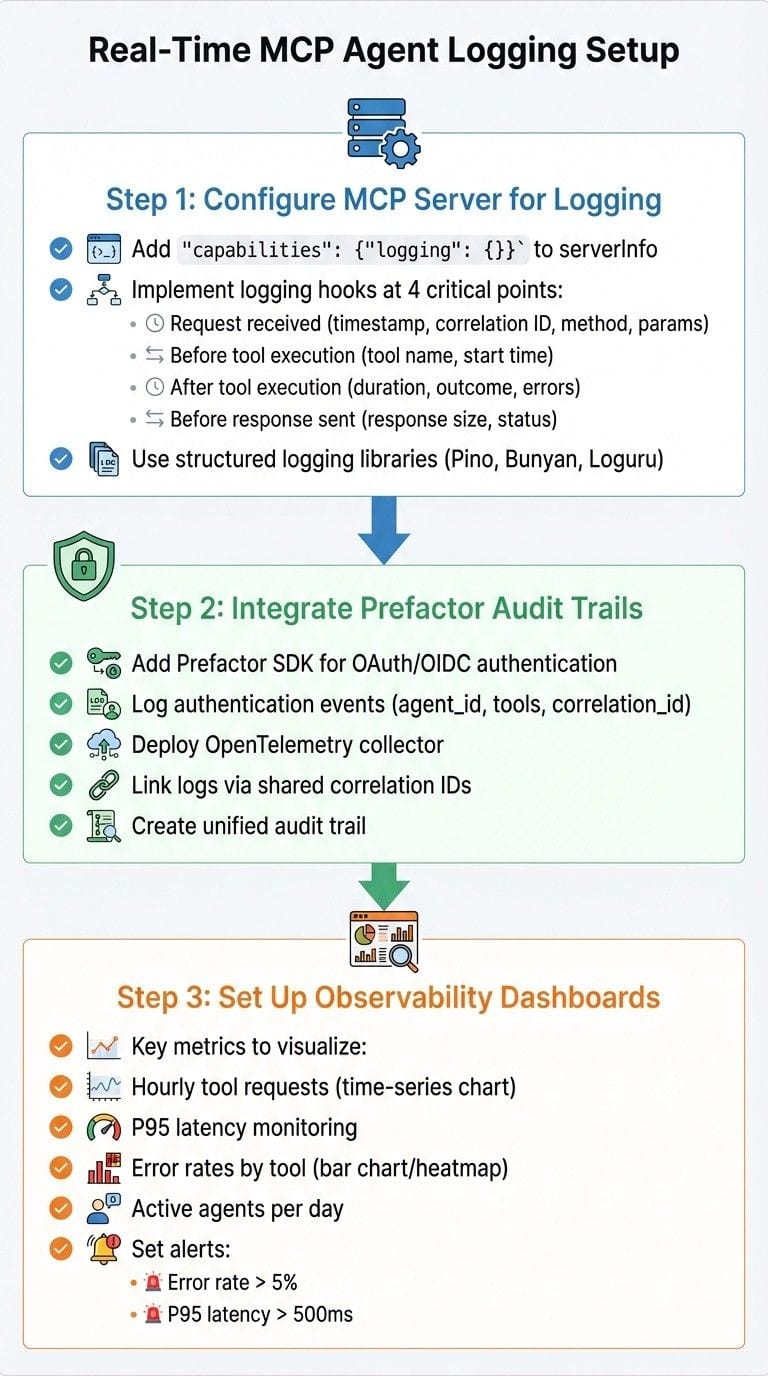
{Real-Time MCP Agent Logging Setup: 3-Step Implementation Guide}
Step 1: Configure MCP Server for Logging
To get started, update your MCP server to support logging during the protocol handshake. This involves adding "capabilities": {"logging": {}} to your serverInfo response. By doing so, clients can adjust log verbosity dynamically using logging/setLevel requests.
Next, implement logging hooks at critical points in your request lifecycle. Here’s what to log:
- When a JSON-RPC request comes in: Record the timestamp, a correlation ID (use the request's
idor generate a UUIDv4), the method name, and sanitized parameters. - Before and after tool execution: Log the tool name, start time, duration, outcome, and any errors.
- Before sending the response: Capture the response size and status.
Here’s a JavaScript example:
<code>async function handleToolCall(req, res) {
  const start = Date.now();
  const correlationId = req.id || generateUUID();
  logger.info({ event: 'request_received', method: req.method, params: sanitize(req.params), correlation_id: correlationId });
  try {
    const result = await dispatchTool(req.params);
    logger.info({ event: 'tool_executed', tool: req.params.tool, duration_ms: Date.now() - start, correlation_id: correlationId });
    res.send(result);
  } catch (error) {
    logger.error({ event: 'tool_error', error: error.message, duration_ms: Date.now() - start, correlation_id: correlationId });
    res.error(error);
  }
}</code>
For consistent and structured logging, use libraries like Pino or Bunyan in Node.js, or Loguru for Python. Once these hooks are in place, you’ll be ready to integrate audit trails in the next step.
Step 2: Integrate Prefactor Audit Trails
Prefactor provides detailed agent-level audit trails that track authentication events, delegated access, and authorization decisions. These logs can be linked to your MCP tool calls for a complete picture of user activity. To set this up:
- Add the Prefactor SDK to your MCP server for OAuth/OIDC authentication.
- Log authentication events, such as successful logins, like this:
- Deploy an OpenTelemetry collector to aggregate both Prefactor audit logs and MCP server logs. Use the OTLP exporter to send these logs to your observability platform.
By ensuring all logs share the same correlation ID, you create a unified audit trail that connects authentication events to tool usage. This is critical for compliance and security investigations.
Step 3: Set Up Observability Dashboards
With logging and audit trails in place, the next step is to channel these logs into your observability system. Use log drains or OTLP exporters to forward data and create dashboards to monitor key metrics.
Here are some examples of useful visualizations:
- Hourly tool requests: Use a time-series chart to track activity trends.
- P95 latency: Calculate the 95th percentile latency with a query like this:
- Error rates by tool: Use a bar chart or heatmap to highlight tools with high error rates:
- Active agents per day: Track unique agent activity with this query:
Set up alerts to notify your team when error rates exceed 5% or P95 latency goes over 500ms. Use correlation IDs to trace failed requests end-to-end - from authentication through Prefactor logs to tool execution.
In Grafana, embed these queries into panels and configure notifications for your SRE and security teams. This real-time monitoring helps you catch unauthorized access, track agent activity, and fix performance issues before they escalate.
sbb-itb-6699583
Best Practices for Secure and Efficient Logging
Building on the earlier configuration steps, these practices ensure your logging system captures detailed events while staying secure and efficient.
Use Structured and Encrypted Logs
To maintain clarity and consistency, structure your logs in JSON format with standard fields like ISO 8601 timestamps, log level, correlation ID, agent ID, tool name, duration, and outcome status. Using established JSON logging libraries helps ensure clean and reliable output.
For security, protect logs during transmission by using TLS for all connections. At rest, store logs in systems that support both disk-level and application-level encryption, with key management handled through a Key Management System (KMS) that enforces regular key rotation policies.
Avoid logging sensitive information such as raw access tokens, API keys, or full user prompts. Instead, use hashed, referenced, or redacted values. Additionally, mask personally identifiable information (PII), like email addresses or phone numbers, and enforce centralized policies to prevent engineers from unintentionally logging secrets during debugging. By following these practices, you enhance the security of your logs while maintaining transparency and compliance.
Implement Access Controls
Once your logs are securely structured and encrypted, the next step is to control access to them. Treat logs as sensitive assets and restrict access using role-based access control (RBAC) through a central identity layer, such as SSO with OAuth/OIDC or SAML. Full log access should be limited to on-call Site Reliability Engineers (SREs), security teams, and explicitly authorized developers. Other roles can access aggregated metrics or redacted dashboards instead of raw logs.
If you’re using Prefactor for MCP authentication, its agent-level audit trails can track who accessed specific tools, while authorization decisions are logged separately with immutability guarantees.
Introduce access controls gradually to minimize disruptions. Start by enabling shadow logging in staging environments to test volume and latency impacts. Once verified, roll out stricter RBAC in production, ensuring your engineering team is informed of the timelines. Use feature flags to incrementally apply redaction rules or adjust log levels, with the flexibility to roll back if performance issues arise. All access control changes should go through a proper change management process, with periodic reviews and automatic deactivation of inactive users.
Monitor and Optimize Log Performance
After securing and managing access to your logs, focus on monitoring and optimizing their performance. Track key metrics such as log volumes (events per second, GB per day by agent and environment) and apply sampling to non-critical events, while retaining 100% of ERROR and SECURITY logs. Define retention tiers - hot storage for 7–30 days, warm storage for 90 days, and archival storage for 1–7 years - to balance searchability with compliance requirements.
Reduce unnecessary payloads by pruning fields, especially for large data like full LLM prompts, and store references instead.
Make logging asynchronous by using local buffers to batch and compress requests, which helps keep MCP servers responsive. Implement backpressure handling to down-sample or drop non-critical logs when queues are full, ensuring core request handling remains unaffected.
Set up alerts for critical events such as spikes in denied tool calls, failed authentications, elevated error rates, or latency spikes. Use both static thresholds (e.g., error rate >2% over 5 minutes) and statistical anomaly detection to identify performance issues early. These strategies will help your logging infrastructure scale effectively while meeting the security and compliance standards required for real-time agent logging.
Prefactor Plan Comparison for Logging Features
Prefactor's plans are designed to log every action taken by AI agents, right at the agent level. This essential feature enables organizations to uphold strong security measures, whether they're in the early stages of development or managing large-scale enterprise deployments.
Each plan is tailored to meet specific needs, offering varying levels of log retention, event detail, export capabilities, and integration options. These features ensure comprehensive visibility and security. Prefactor's SOC 2 compliance further highlights its commitment to maintaining data integrity and privacy, aligning with the best practices for security and observability outlined earlier.
Prefactor provides adaptable and scalable solutions for real-time MCP logging. Reach out to Prefactor for more information on configurations and to choose the plan that best fits your needs.
Conclusion
Real-time MCP logging offers a powerful way to enhance AI deployments by providing structured JSON logs with correlation IDs, ensuring full traceability. This setup allows for quick reconstruction of agent sessions and efficient identification of failures, addressing governance, compliance, and security requirements. According to industry research, centralized and structured logging can cut the mean time to resolution by 30–50%, a significant edge during incident response.
This guide walks you through the entire process - from configuring MCP servers and integrating audit trails to creating observability dashboards - ensuring a smooth transition from experimentation to production. Features like asynchronous logging, encryption, and strict access controls safeguard sensitive data while maintaining agent performance. These steps help establish secure, high-performance production environments.
Prefactor builds on this foundation by offering agent-level audit trails, secure authentication, and scoped authorization. A CTO from a venture-backed AI company noted, "The biggest challenge in MCP today is ensuring control and visibility for secure production deployment." Prefactor tackles this challenge by tying every agent action to an authenticated identity and logging it for compliance and forensic purposes.
Whether you're managing a small number of agents or scaling up to machine-level deployments, MCP's logging capabilities combined with Prefactor's authentication platform provide the control and visibility needed for secure, scalable AI operations. Start with the prerequisites, follow the configuration steps, apply best practices, and choose the Prefactor plan that aligns with your compliance needs.
With these tools in place, MCP-based agent deployments can seamlessly move from the lab to production environments.
FAQs
How does MCP improve security and compliance with real-time agent logging?
Real-time agent logging with MCP enhances both security and compliance by offering full transparency into the activities of AI agents. It generates detailed audit trails that capture every interaction, ensuring there's a clear record for accountability and traceability.
Additionally, MCP supports secure agent identities and allows for delegated, policy-based access. By working seamlessly with existing identity systems, it minimizes risks while helping organizations meet regulatory standards efficiently.
What do I need to set up MCP logging in a production environment?
To enable MCP logging in a production setup, you must first have Prefactor’s MCP authentication infrastructure fully established. This involves integrating it with your current OAuth or OIDC systems, implementing secure identity management for agents, and setting up robust access controls.
You’ll also want to deploy policies via CI/CD pipelines. This approach ensures proper version tracking and thorough testing. By doing so, you can maintain security, scalability, and compliance for your AI agents, all while supporting real-time logging functionality.
How can I combine Prefactor audit trails with MCP logging for better tracking and security?
You can link Prefactor's audit trails with MCP logging using its agent-level audit trail features, which automatically record actions, identities, and access events. These logs can be effortlessly combined with MCP logs, creating a unified perspective on all agent activities and interactions.
This setup improves traceability by associating every action with a specific agent and context, bolstering both security and compliance. It offers a thorough method to monitor and oversee agent behavior as it happens.