
MCP audit compliance ensures secure and regulated management of AI-driven delegated access systems. This guide outlines actionable steps to enhance security, meet regulatory standards like SOC 2 and HIPAA, and reduce risks tied to AI agent access. Key takeaways include:
- Enforce Least Privilege Access: Limit AI agents to only the permissions needed for specific tasks to prevent data exposure.
- Maintain Detailed Audit Trails: Log every action in the MCP environment, including timestamps, user identities, and system responses, for compliance and forensic investigations.
- Automate Access Reviews: Replace manual reviews with automated tools to detect and revoke unnecessary permissions, reducing "access creep."
- Monitor Activity in Real-Time: Track user and agent behavior to detect anomalies like unauthorized access or unusual patterns.
- Fix Permission Misconfigurations: Use automated tools and audits to identify and resolve over-permissioning and security gaps.
Platforms like Prefactor streamline these processes by offering centralized governance, real-time visibility, and compliance tools tailored for MCP systems. By implementing these practices, organizations can secure their AI environments and meet regulatory demands effectively.
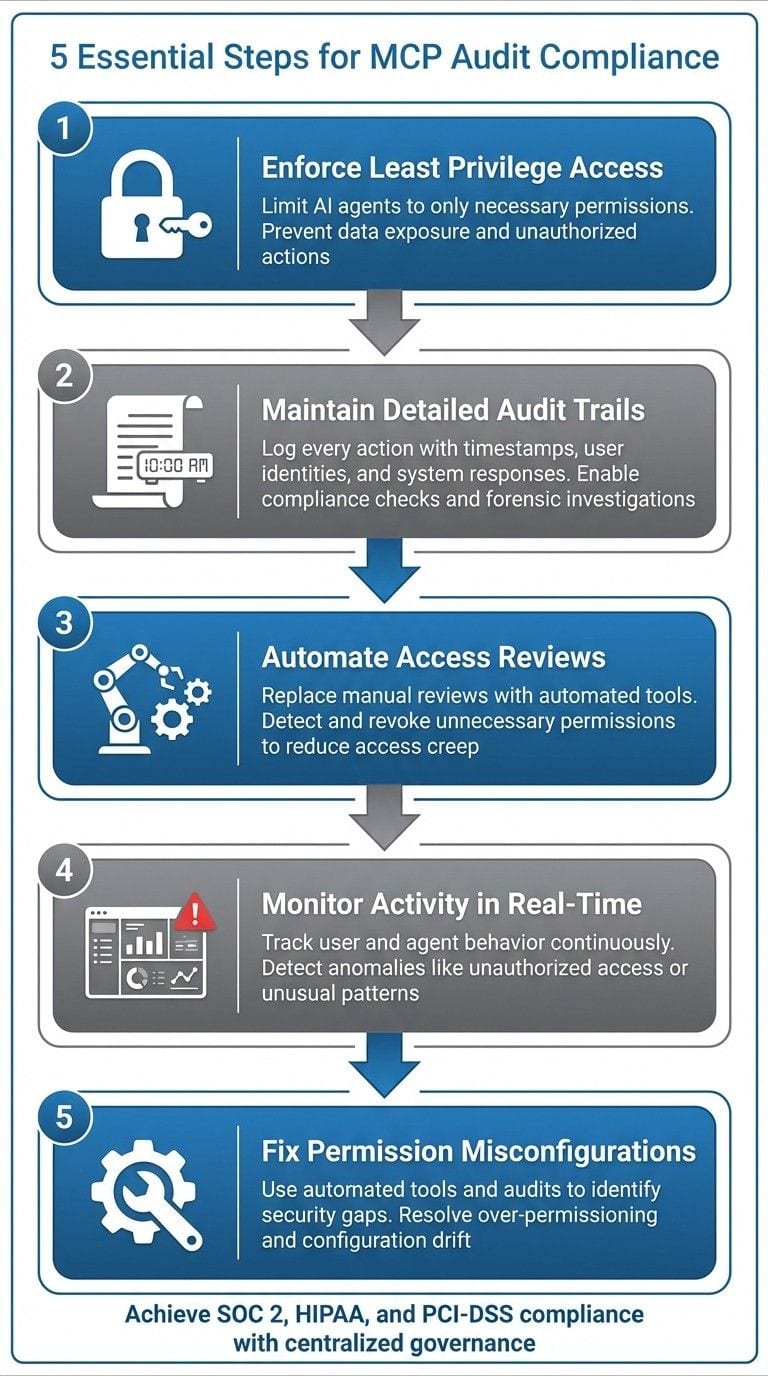
{5 Essential Steps for MCP Audit Compliance Implementation}
Apply Least Privilege Access Controls
Understanding Least Privilege Access
The principle of least privilege ensures that every user, service account, and AI agent is granted only the permissions they need to perform their tasks - nothing more. In MCP frameworks that involve delegated access, this means limiting an agent's access strictly to the tools, resources, and data required for its specific workflow. This is especially important for autonomous AI agents, as excessive permissions can quickly lead to data exposure or unauthorized actions. In regulated industries, strict access controls are not just a best practice - they're often a compliance requirement to prevent unauthorized access.
By restricting access to sensitive U.S. data, such as PHI, PII, or cardholder information, only to individuals or systems with a clear, documented business need, organizations can reduce risks like credential theft, prompt injection attacks, model errors, or misconfigurations. This approach also simplifies anomaly detection in audit logs and demonstrates "reasonable security" measures to auditors. In turn, this can help lower liability and reduce the financial impact of potential breaches.
How to Enforce Least Privilege in MCP Systems
Enforcing least privilege in MCP systems starts with a clear understanding of workflows. Identify the business processes where MCP agents play a role - whether in customer support, financial reporting, or other areas - and determine the specific systems, APIs, and data elements required for each task. Based on this analysis, create roles tailored to particular functions, such as a "Finance-Read-Only-MCP" role, with well-defined permissions, actions, and data access limits.
Permission scoping should be applied at three levels:
- Tools: Restrict API calls to only those necessary.
- Data: Limit access based on classification or specific fields.
- Environment: Segregate access between development, testing, and production environments.
To streamline access control, implement role-based access control (RBAC). Integrate MCP systems and AI agents with a central identity provider so that roles are managed from a single, unified source. Assign roles to projects, datasets, and environments, and bind them to security groups (for users) or service principals (for agents). For high-privilege actions, introduce time-bound, approval-based access with comprehensive logging to track activity.
Regular reviews are essential to maintaining least privilege. Conduct quarterly reviews for standard roles and increase the frequency to monthly for high-risk roles. Provide managers with access lists for verification and ensure MCP-connected systems are routinely scanned for overly broad permissions, inactive accounts, and unnecessary access. For example, permissions that haven’t been used in 90 days should be flagged for removal. Tools like Prefactor can help by automatically identifying high-risk permission patterns, offering real-time visibility into agent access, and generating audit-ready reports for reviews, approvals, and revocations.
Maintain Complete Audit Trail Logs
What Audit Trails Track
Audit trails are essentially time-stamped records that document every action within your MCP environment. They create a detailed history of who performed an action, what they did, when they did it, and why it was done. In systems where AI agents operate autonomously, these logs are vital for compliance checks and forensic investigations.
An effective audit trail includes details like user identity, role, action type, the resource targeted, timestamps (with time zones), IP addresses, devices used, and system responses. For more intricate investigations, it’s helpful to include unique identifiers for multi-step workflows and any references to human approvals or policy overrides. This level of detail allows investigators to piece together the entire sequence of events when something goes wrong or when regulators demand proof of proper access controls.
This is particularly important in environments where AI agents can execute significant actions without human oversight. Without logs that capture agent prompts, actions, and data sources, it’s nearly impossible to prove that access was appropriate, policies were followed, or sensitive information was handled correctly. These detailed records not only enable quick incident analysis and root-cause identification but also help distinguish between user mistakes and system errors.
Such comprehensive logs form the backbone of strong, centralized audit practices.
Audit Logging Best Practices for MCP
To ensure complete visibility in MCP environments, it’s critical to standardize logging practices. Use a common logging schema with predefined fields, IDs, and severity levels, and ensure all agents and tools adhere to this format. Centralize all logs in a SIEM (Security Information and Event Management) system to seamlessly correlate events across the ecosystem. Make sure to log activity at key points like policy gateways and MCP control planes, capturing both "allow" and "deny" decisions. These failure logs often highlight potential abuse or vulnerabilities.
Logs should be stored securely in tamper-proof, append-only storage with cryptographic hashing. They should also be encrypted both during transmission and while at rest. To prevent tampering, restrict write access and segregate duties so that individuals managing agents or data cannot alter logs that track their actions. Retention policies should align with U.S. regulatory and contractual requirements, particularly for sectors like finance or healthcare, where multi-year log retention is often mandatory.
For efficient monitoring, normalize and enrich log data. Develop a consistent event taxonomy - such as access.request, access.decision, agent.action, config.change, or anomaly.detected - and ensure all MCP and related events fit into this structure. Enrich logs upon ingestion with user details (e.g., department, manager, region), data sensitivity labels, agent or tool names, and the operating environment (e.g., dev, test, or prod). Synchronize timestamps using NTP and include standardized correlation IDs to connect workflows across systems, from the initial user action to the final system update. Prebuilt views and saved queries - such as tracking "agent access to PHI in the past 30 days" or "policy overrides in production environments" - can help compliance and security teams respond quickly during audits or incidents.
Platforms like Prefactor simplify governance by offering a unified layer to monitor, control, and audit all MCP and agent activities, even when agents interact with multiple back-end systems. Prefactor provides real-time visibility into every agent decision and downstream action, automatically logging prompts, tool usage, results, and policy decisions into a centralized audit trail. With built-in compliance tools, such as approval workflows for high-risk actions and detailed reporting tailored for U.S. regulators and internal audits, Prefactor turns raw logs into actionable insights. By bridging accountability gaps created by autonomous agents, these practices ensure that every access decision is traceable and audit-ready.
Automate Access Reviews and Certifications
Why Automate Access Reviews
As MCP environments grow, manual access reviews quickly become unworkable. Relying on spreadsheets and email chains often leads to "access creep" - a buildup of unnecessary entitlements that can open the door to security risks and compliance issues.
Automating access reviews changes the game. By pulling entitlement data directly from identity providers, HR systems, and MCP policy stores, this approach gives reviewers a complete picture of current access. No more guessing or dealing with incomplete data. When anomalies like cross-department access or dormant accounts with excessive privileges pop up, reviewers can act quickly and decisively. Plus, every action, timestamp, and decision is logged, providing the kind of audit trail required by U.S. compliance frameworks like SOX, SOC 2, HIPAA, and GLBA.
Automation also introduces risk-based prioritization. For instance, organizations can schedule monthly reviews for agents with write access to financial systems while handling routine read-only permissions on a quarterly basis. High-risk scenarios - such as users accessing protected health information or those with broad data export privileges - can be flagged for immediate, off-cycle reviews. This ensures that reviewers focus on the highest risks, while lower-risk access can be automatically approved based on predefined policies.
Features for Automated Access Certifications
A robust automated certification system should allow for flexible, risk-driven scheduling - monthly reviews for high-risk roles and quarterly for lower-risk permissions. It should also route reviews to the appropriate owners through workflows, ensuring high-risk entitlements adhere to separation of duties.
To prevent missed reviews from slipping through the cracks, the system should enforce escalation rules. For example, if a review is overdue, it could be reassigned automatically or trigger immediate revocation of access based on policy. Dashboards should provide a clear overview of key metrics like completion rates, revoked versus retained entitlements, and overdue certifications. For audit purposes, the platform must generate detailed reports showing who reviewed what, when, and why, along with evidence that revoked permissions were enforced across downstream systems.
Deep integration with MCP policy engines is key. The system should ingest real-time entitlement data and automatically update policies via API. If a reviewer revokes access, the MCP access policy should adjust immediately - no manual follow-up required. Platforms like Prefactor handle this integration seamlessly, acting as a central hub that syncs review decisions with agent configurations and underlying systems. This centralized approach not only ensures visibility but also turns certification data into actionable insights. Compliance teams can easily confirm that certified access matches actual usage patterns and that every decision is traceable and ready for audit. These automation techniques reinforce the centralized oversight discussed earlier, making access management both efficient and secure.
The Security Problem with MCP | Identity, RBAC & Audit
Monitor User Activity and Access Patterns
Once access reviews are automated, the next big priority is keeping a close watch on what users and agents actually do with their permissions. In multi-cloud provider (MCP) setups, elevated permissions often stretch across multiple systems, meaning a single misuse could jeopardize the entire infrastructure. Real-time monitoring plays a key role here, offering detailed, time-stamped records that auditors expect - tracking who did what, when, where, and how. This level of oversight ensures compliance with regulations like SOC 2, HIPAA, and PCI-DSS.
The risks are no joke. Microsoft's Partner Center security guidance urges partners to "implement audit logging best practices and perform routine review of activity performed by delegated administrator accounts" to safeguard delegated access. Partners must also act quickly on security alerts - often within 24 hours - making real-time or near-real-time monitoring a non-negotiable part of staying compliant. This foundation also makes it easier to integrate real-time alerts and incident response measures.
Setting Up Real-Time Activity Monitoring
Start by defining the scope of your monitoring. This involves pulling together sign-in and audit logs from all critical sources, such as identity platforms, MCP control planes, cloud providers, SaaS applications, and AI agent control planes. Retain these logs for as long as regulations require - usually between one and seven years.
Centralize your logging using a SIEM or log management tool. For delegated access models, create specific monitoring rules for high-privilege and delegated administrator accounts. Set up alerts for activities outside approved maintenance windows or from untrusted IPs. Include MCP activity logs in the same pipeline to get a complete view - from the user to the agent and downstream systems.
Focus your monitoring on key activities like authentication events, privilege changes, configuration updates, sensitive data operations, and agent-specific behaviors. Regularly review reports highlighting risky users and sign-in risks. Take immediate action when necessary, such as enforcing password resets, requiring step-up MFA, or suspending accounts flagged as high risk.
Prefactor simplifies real-time activity monitoring by centralizing audit trails and standardizing observability, metadata, and policy enforcement directly at the agent layer. This eliminates the need for custom monitoring setups.
Detecting and Responding to Anomalies
Effective alerting is all about striking the right balance - capturing critical security issues without drowning in false positives. Start by focusing on high-impact, clear-cut behaviors that demand immediate attention. These might include creating new global admin-equivalent roles, disabling key security controls, exporting large amounts of data, or accessing systems from flagged locations.
Establish baselines for normal behavior across users, roles, and agents. Pay attention to patterns like typical login times, commonly accessed applications, standard data volumes, and usual geographic locations. Set up alerts for deviations from these norms. Assign risk scores to events based on factors like data sensitivity, privileged access, and geographic anomalies. Escalate alerts only when they exceed a certain risk threshold. Combining multiple weak signals - like first-time access to a resource, an unusual IP address, and mass data reads - can help cut down on unnecessary noise.
When an alert is triggered, act fast. Gather all relevant details automatically, such as user or agent profiles, recent activity logs, related change requests, the sensitivity of the accessed data, and the reputation of the originating IP. Escalate high-risk alerts immediately. For moderate risks, send them to a human for quick review. Low-risk events can simply be logged for continued monitoring. Containment actions might include disabling the affected user account or agent, revoking active sessions or tokens, reducing access privileges, or isolating impacted resources.
Document every step thoroughly for audit purposes. This ensures every anomaly is logged, reviewed, and traceable. Prefactor can help automate parts of this workflow - like pausing an agent, integrating case records, and generating exportable audit reports. By streamlining these tasks, you can maintain real-time visibility and stay ahead of potential issues while making compliance easier to demonstrate.
Identify and Fix Permission Misconfigurations
Even with monitoring tools in place, permission misconfigurations remain one of the most pressing threats to MCP audit compliance. These errors create security vulnerabilities that auditors quickly flag, such as AI agents gaining unauthorized access to sensitive data or hardcoded credentials bypassing authorization protocols. For example, in financial institutions, thorough MCP logging has uncovered misconfigurations early enough to detect and prevent fraud up to 48 hours before incidents occur - helping to significantly reduce penalties.
The risks are substantial. For organizations deploying AI agents at scale, permission errors can lead to more than just financial penalties - they can erode trust and disrupt production deployments. To stay compliant with regulations like SOC 2, HIPAA, and PCI-DSS, it’s critical to understand why these errors occur and how to address them.
Why Misconfigurations Happen
Permission errors generally arise from three key factors: manual mistakes, system complexity, and configuration drift.
- Manual errors: These are often the result of administrators granting excessive permissions in haste or failing to apply least privilege principles. For instance, neglecting to classify data properly in tools like Microsoft Purview can lead to "Highly Sensitive" information being accessed during AI retrieval, potentially breaching SOC 2 or GDPR standards.
- System complexity: Multi-platform MCP environments - spanning tools like SharePoint, OneDrive, Teams, and AI control planes - introduce challenges with unpredictable inheritance and shared access policies. Over time, these issues can allow over-permissioning risks to pile up unnoticed, especially as manual configurations struggle to keep pace with expanding agent deployments.
- Configuration drift: Even securely set systems can degrade over time due to automated updates, user-driven changes, or evolving policies. Permissions become outdated without continuous oversight. Traditional static roles designed for human users often fail in dynamic AI environments, where agents need context-aware, scoped access. Applying measures like MFA or rigid roles to AI agents can disrupt workflows, leading to insecure workarounds - a problem Prefactor describes as access becoming "chaotic - and dangerous" without policy-as-code and delegated trust.
By addressing these root causes, organizations can implement targeted solutions that reduce risks.
How to Fix Permission Issues
To resolve permission misconfigurations effectively, start with automated tools and follow up with human oversight.
- Automated scanning: Use automated scanning tools to continuously audit your MCP environment. Schedule scans across platforms like SharePoint, OneDrive, Teams, and agent control planes to identify over-permissioning, hardcoded secrets, and inherited risks. Tools like Microsoft Purview can classify data in real-time and enforce DLP policies that flag unauthorized access. Set up alerts for critical changes that require immediate attention.
- Regular audits: While automation is essential, human oversight remains irreplaceable. Conduct quarterly audits of logs to ensure sensitive data (e.g., PHI under HIPAA) isn’t overexposed. Combine this with penetration testing, dependency checks, and security code reviews to uncover permission gaps. Use a severity classification system - Critical, High, Medium, Low - to prioritize fixes and maintain detailed documentation for audit purposes.
- Role-based access control (RBAC): Enforce least privilege principles with strict RBAC policies. Regularly rotate API keys, use OAuth 2.0 with short-lived tokens, and require per-request authorization to prevent privilege escalation. For AI agents, grant scoped access tied to specific tasks instead of broad permissions. Centralize logs to improve visibility, and set thresholds (e.g., five failed authentication attempts) to trigger immediate alerts.
- Policy-as-code: Adopt policy-as-code practices for managing MCP access. Define access rules once and deploy them through CI/CD pipelines to keep configurations versioned, testable, and reviewable. This reduces manual errors and prevents configuration drift. Prefactor enhances this process by offering real-time visibility and detailed audit trails at the agent level, addressing accountability gaps that contribute to the failure of many AI projects. By centralizing audit trails and standardizing enforcement, Prefactor helps organizations identify and correct misconfigurations before they lead to security vulnerabilities or compliance issues.
Use Prefactor for Real-Time Visibility and Compliance
As organizations scale their deployment of AI agents, managing access, monitoring activity, and ensuring compliance across MCP environments becomes increasingly complex. Prefactor steps in as a centralized Agent Control Plane, offering a streamlined way to govern access, oversee operations, and maintain compliance in real time.
How Prefactor Supports MCP Audit Compliance
Prefactor provides the tools needed for effective centralized governance, offering detailed insights that simplify audit compliance. It delivers real-time visibility, comprehensive audit trails, and identity-based governance, tracking every step of an agent's request lifecycle. From the initial request to MCP tool selection and final action, Prefactor captures timestamped telemetry, including user and agent identities, resource access details, policy decisions, and any flagged anomalies. Security teams can quickly review timelines for individual agents, identifying which MCP tools were used, what data was accessed, and whether any actions violated established policies.
The platform also maintains tamper-proof, immutable records of all security events. This includes agent registrations, MCP configurations, access changes, policy evaluations, and admin overrides. Each event is logged in a standardized format with unique IDs, ISO 8601 timestamps, and actor identities tied to enterprise identity providers. This structure simplifies the process of reconstructing multi-step workflows and presenting evidence during audits. For U.S.-based organizations, this approach aligns seamlessly with regulatory frameworks like SOC 2 and HIPAA, which mandate detailed access records and strict retention policies.
Prefactor’s identity-based governance directly connects enterprise identity providers to agents and MCP tools, enforcing policies at the identity level. This allows for precise controls, such as restricting agents to U.S. customer data when accessed by U.S.-based staff, requiring additional approvals for accessing sensitive data like PHI or PCI, and limiting high-risk actions to privileged users with documented justifications. Features like time-bound access with automatic revocation and policy-as-code through CI/CD pipelines ensure consistency, eliminate manual errors, and prevent configuration drift.
Real-time compliance controls further enhance security by blocking or redacting access to sensitive records, enforcing geographic restrictions, applying rate limits, and triggering instant kill-switches for suspicious activity. These measures ensure that high-risk operations are subjected to additional scrutiny, meeting regulatory standards that prohibit unchecked agent actions.
Prefactor Pricing and Plans
Prefactor offers flexible pricing to accommodate organizations of all sizes and needs:
Plan Name | Price | Description | Features
Basic | Custom Pricing | Ideal for small teams or startups | MCP authentication, agent identity, basic audit trails
Pro | Custom Pricing | Advanced features for growing businesses | All Basic features, scoped authorization, multi-tenant support
Enterprise | Custom Pricing | Comprehensive tools for large enterprises | All Pro features, CI/CD-driven access, advanced compliance capabilities
The Basic plan is designed for smaller teams managing a limited number of agents in single environments. It provides essential governance tools, such as logging agent-tool interactions and decisions for internal monitoring. The Pro plan caters to businesses requiring more advanced features, including granular policies for agents and teams, as well as multi-tenant support - perfect for SaaS providers and organizations needing to demonstrate tenant isolation. The Enterprise plan is tailored for highly regulated industries, offering CI/CD-driven access management, policy-as-code, detailed attestation workflows, and custom compliance reporting. This plan is ideal for companies aligning their operations with SOC 2, HIPAA, or other stringent regulatory requirements.
Conclusion
In this guide, we’ve explored how best practices ensure secure delegated access in MCP environments. Protecting AI agents demands strong access controls, continuous monitoring, and full visibility. These elements are key to establishing accountability in delegated access frameworks. With the average cost of a data breach reaching $4.8 million per incident, organizations simply can’t afford to treat compliance as an afterthought or depend on manual processes that might miss crucial interactions.
Effective governance is critical for scaling AI agents successfully. A staggering 95% of agentic AI projects fail due to gaps in accountability. However, tools like automated logging, centralized policy enforcement, and real-time anomaly detection change the game. They shift compliance from a quarterly headache into an ongoing operational advantage, allowing organizations to meet regulatory standards like SOC 2, HIPAA, and GDPR while maintaining efficiency and speed. Tools designed for real-time oversight simplify this proactive approach.
FAQs
What are the essential steps to ensure compliance with MCP audits?
To stay on top of MCP audits, it's crucial to establish detailed audit trails that log every activity and change within your system. These trails act as a safety net, helping you trace actions and ensure accountability. Pair this with strict access controls by assigning permissions based on specific roles and responsibilities, ensuring that users only access what they truly need.
Using real-time monitoring tools adds another layer of security, giving you constant visibility into your operations. By integrating with existing identity management systems, you can simplify authentication and authorization, making the process smoother and more efficient. Finally, adopting policy-as-code is a smart move - it provides scalable, consistent access management while minimizing the chances of errors or misconfigurations.
How does Prefactor ensure real-time visibility and compliance for MCP audit frameworks?
Prefactor serves as a centralized hub, offering real-time oversight and control over AI agent interactions within MCP-based frameworks. By creating detailed audit trails, tracking agent activities, and dynamically applying security policies, it helps organizations maintain compliance with regulatory requirements.
With Prefactor, businesses can keep a constant eye on AI agent operations, minimizing compliance risks while maintaining tighter operational control - especially as they expand their AI initiatives.
Why is it important to automate access reviews in MCP environments?
Automating access reviews in MCP environments plays a key role in ensuring security, precision, and compliance. This process keeps a constant check on agent permissions, minimizing the chances of human mistakes and preventing unauthorized access.
With automation, organizations can achieve real-time oversight and control of agent activities, which becomes increasingly important as AI agents grow in number and interact with sensitive systems. This method not only bolsters governance but also simplifies operations, making compliance easier to handle and more efficient.