
MCP (Model Context Protocol) systems are powerful but come with significant security risks. Breaches can lead to data theft, unauthorized access, or malicious actions across your infrastructure. This guide offers practical steps to secure and monitor MCP systems effectively, focusing on preparation, real-time monitoring, threat detection, investigation, and response.
Key Takeaways:
- Preparation: Implement detailed logging, telemetry, and centralized dashboards for visibility. Establish baselines to detect anomalies.
- Real-Time Monitoring: Use Endpoint Detection and Response (EDR) tools and AI-specific behavioral analytics to track unusual agent activity.
- Threat Detection: Validate MCP traffic, enforce strict authorization, and integrate threat intelligence feeds.
- Investigation: Maintain centralized audit trails and agent relationship graphs to trace incidents and assess impact.
- Response: Use kill switches, apply Zero Trust principles, and conduct post-incident reviews to strengthen defenses.
Start by securing your MCP environment with robust logging and monitoring systems, then layer on real-time detection and response tools to mitigate risks.
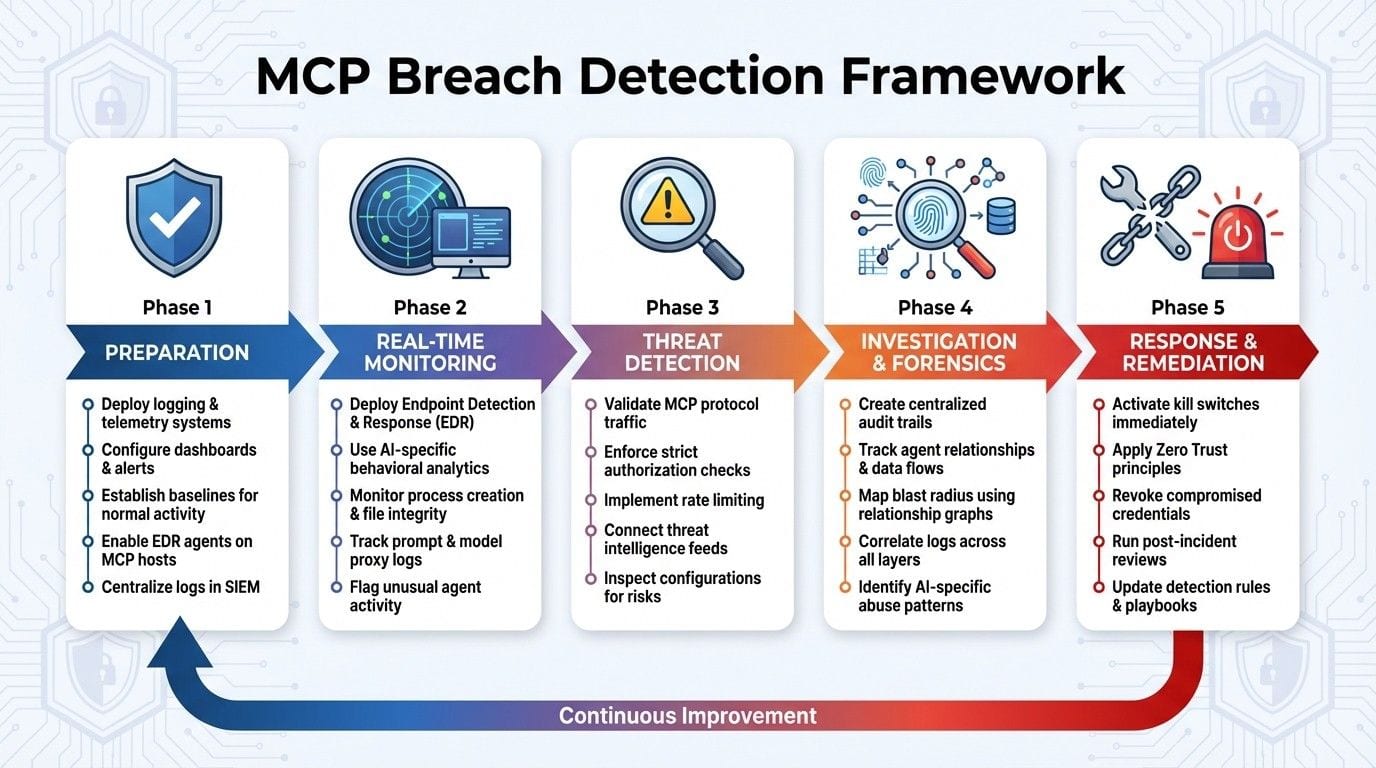
{5-Phase MCP Breach Detection Framework: From Preparation to Response}
Preparation Phase Checklist
Deploy Logging and Telemetry Systems
Setting up effective logging and telemetry systems is critical for real-time monitoring and identifying potential threats. Before rolling out MCP systems, ensure you implement detailed logging across all components. This includes telemetry from MCP clients, servers, model proxies, endpoints, and cloud control planes - not just application logs. The goal is to track tool calls, prompt flows, and model decisions to catch risks like prompt injection or unauthorized data access.
For robust monitoring, enable detailed logs on all MCP clients and servers. Each log entry should include timestamps in UTC (converted to U.S. time zones like PST or EST for SOC teams), user or agent identity, tool names, parameters, and results. Deploy EDR agents on MCP hosts to monitor changes in processes, files, and network connections. Additionally, collect logs from identity and cloud control planes, as MCP workflows often involve interactions with IAM roles, API keys, and CI/CD pipelines.
Configure MCP-aware applications to log tool invocations, resource usage, model selections, and rate limits. For model proxies, ensure both input prompts and responses are logged to detect issues like prompt injection or data exfiltration. To streamline investigations, centralize all logs in a SIEM or data lake using a consistent log format.
Run MCP workloads in a baseline phase to establish what "normal" looks like - this includes typical tool usage, prompt sizes, and data access patterns. Use this baseline to set anomaly detection rules that flag unusual activities, such as off-hours use of cloud admin tools or unexpected spikes in sensitive file access. Finally, integrate these insights into real-time dashboards for ongoing monitoring.
Configure Dashboards and Alert Systems
Once logging is in place, setting up dashboards and alerts becomes the next step in ensuring quick responses to anomalies. Aggregate MCP telemetry into role-based dashboards that provide a clear view of server status, high-risk activities, and policy decisions. Include panels that track policy actions - such as allowed, blocked, or pending activities - and note any exceptions granted.
"The biggest problem in MCP today is consumer adoption and security. I need control and visibility to put them in production." - CTO, Venture-backed AI company
Design dashboards using U.S.-standard date and time formats (MM/DD/YYYY, with clear time zones like PST or EST) and straightforward number formatting. Highlight trends and anomalies, such as the emergence of new tools, sudden shifts in model usage, or unexpected spikes in privileged actions. Include alerts for key MCP activities like "Destructive command blocked", "Prompt injection detected", or "Unauthorized tool change."
Set up real-time alerts for critical events, including:
- Changes to production infrastructure
- Database exports
- Code deployments
- Unapproved MCP actions
- Policy engine failures
Categorize alerts by severity (critical, high, medium, low) and map them to predefined response playbooks and escalation protocols. Ensure these are integrated with U.S.-focused incident management tools for seamless handling.
For organizations managing multiple AI agents and MCP servers, using a centralized control plane like Prefactor can simplify governance during this preparation phase. Prefactor provides real-time visibility, standardized audit trails, and policy enforcement across various agents and MCP setups. It helps track essential details - who did what, when, and why - and bridges the accountability gap that traditional tools often leave open. This is especially valuable for U.S. enterprises facing stringent audit and regulatory requirements.
Real-Time Monitoring Checklist
Deploy Endpoint Detection and Response (EDR)
Real-time monitoring starts at the host level, where MCP clients and servers execute commands, access files, and interact over the network. Endpoint Detection and Response (EDR) tools provide the detailed telemetry needed to identify threats in action - tracking processes, memory usage, file integrity, and network activity on each MCP host.
In MCP environments, EDR agents should be configured to monitor process creation and execution. This helps identify when MCP clients execute shell commands or when servers run unauthorized binaries. File Integrity Monitoring (FIM) is equally important, as it can alert you to unauthorized changes in MCP configuration files, server definitions, or tool descriptors. Memory scanning is another critical layer, helping to detect in-memory attacks or hidden payloads that traditional file-based scans might miss. Additionally, keep an eye on network connections from MCP servers - flagging outbound traffic to unapproved destinations can help identify potential data exfiltration attempts.
"Application logs can provide the most robust source of telemetry for monitoring and detecting MCP server abuse."
While endpoint telemetry is invaluable, Red Canary highlights that application logs are just as critical. EDR works best when combined with application-level logging. Deploy EDR across all MCP hosts and correlate its data with application logs in your SIEM for real-time analysis. For example, if EDR detects a surge in file reads by an MCP server process and application logs reveal the same server accessing thousands of records in a short time, this could signal a breach in progress.
To complete the picture, integrate endpoint monitoring with AI-specific behavioral analytics for a comprehensive view of MCP threats.
Use AI-Specific Behavioral Analytics
Building on endpoint data, AI-specific behavioral analytics establish benchmarks for normal agent activity - covering typical tool usage, prompt patterns, data access volumes, and access frequencies. These benchmarks help flag unusual behavior that could indicate threats like prompt injection, context manipulation, or data exfiltration.
Start by monitoring prompt and model proxy logs for suspicious activity. Red Canary emphasizes that tracking prompts is "essential for detecting malicious prompts intended to hijack resources". Be on the lookout for prompts that attempt to bypass rules, access unauthorized tools, or exfiltrate sensitive information. Also, track tool invocation patterns - watch for agents requesting broad access (e.g., files:*) or frequently attempting privileged operations outside their typical behavior. Wiz points out that MCP enables a shift from "post-incident forensics" to "real-time policy enforcement that evaluates every request based on identity, environment context, and the specific action being attempted".
To detect data exfiltration, set up rules to identify unusually large or frequent data transfers, such as code, configurations, or sensitive files. Cross-reference these patterns with identity and cloud control plane logs to catch workflows attempting cloud operations that don’t align with a user’s normal role. For U.S. enterprises, incorporate these AI-specific alerts into existing SOC workflows and prioritize anomalies during off-hours when staffing levels are lower.
Focus Area | What to Monitor in MCP | Example Detection Use Case
Endpoint / EDR | Processes, commands, file changes, network connections on MCP hosts | Detect MCP client executing shell commands that modify critical system files.
Application Logs | Tool invocations, parameters, results, identities, scopes | Spot a single user extracting thousands of records from a "read-only" MCP server in minutes.
Prompt & Model Proxy Logs | Prompts, responses, model selection, request metadata | Flag prompts designed to bypass safety rules or extract confidential data.
Identity & Cloud Control Plane | IAM actions, role changes, cloud API calls tied to MCP workflows | Identify an MCP agent using a new admin role to alter production infrastructure.
Token & Scope Events | Token issuance, scope elevation, failed authorization attempts | Alert on repeated admin:* scope requests from a user who rarely performs admin tasks.
Threat Detection Checklist
Monitor and Validate MCP Protocol Traffic
Start by reinforcing your defenses with strict protocol-level checks. Use behavioral analytics to establish baselines and ensure every MCP message meets protocol specifications, leaving no room for hidden threats. Verify that messages adhere to correct types, include all required fields, and only contain allowed values. Immediately log and block any malformed or unexpected fields to thwart injection attempts.
Take it a step further with schema-aware inspection. This method ensures inputs and outputs align with their declared JSON schemas, helping to uncover hidden instructions or unexpected parameters. For instance, if an MCP tool is supposed to accept a simple file path string but receives a nested object containing shell commands, schema validation can catch this anomaly before it causes harm.
Authorization checks are equally critical. Apply per-scope checks on every MCP request by confirming that token scopes, audience, and claims match the intended tool and operation. This approach mitigates risks like confused deputy attacks, where stolen or overly broad tokens might be misused. Centralizing this validation in a proxy layer allows you to normalize, inspect, and log traffic more effectively.
Rate limiting is another essential layer of defense. Instead of blanket limits, implement thresholds that consider identity, tool, and context. Tie these limits to authenticated users or service accounts to prevent a single compromised identity from overwhelming the system. Assign stricter limits to high-risk operations, such as code execution or infrastructure changes, and flag unusual activity, especially during off-peak hours.
Lastly, scrutinize MCP configurations in depth. Regularly inspect server definitions, schemas, and tool metadata for hidden instructions, overly permissive scopes, or risky default settings. Incorporate these checks into your CI/CD pipeline to detect and prevent configuration-as-code attacks or tool poisoning that could lead to data theft or privilege escalation.
Connect Threat Intelligence Feeds
With protocol security in place, bolster your detection capabilities by integrating external threat intelligence. These feeds provide essential context to identify known MCP-specific threats before they escalate. Incorporate indicators such as IP addresses, domains, and certificates linked to MCP-targeting botnets, command-and-control servers, or tool-poisoning campaigns. Correlate these indicators with MCP client and server connections in your SIEM to spot potential threats.
Go beyond basic indicators by leveraging intelligence on tactics, techniques, and procedures (TTPs). For example, stay informed on common prompt injection patterns, configuration abuse methods, or cross-tenant data access schemes. Use this intelligence to create detection rules tailored to MCP traffic and prompts. If a new prompt injection technique surfaces targeting specific MCP tools, you can swiftly establish SIEM rules to flag prompts matching those patterns.
Stay updated by subscribing to security research from trusted vendors like Red Canary, Wiz, Palo Alto Networks, Aqua, Akto, and Stytch. Transform their findings into actionable detection rules and incident response playbooks. Additionally, integrate vulnerability and misconfiguration intelligence - such as newly identified weaknesses in popular MCP servers or libraries - into your detection strategies and hardening processes.
To make this intelligence truly actionable, normalize it into the same schema as your internal MCP telemetry. Map malicious tool names, suspicious scope patterns, or rogue user agents into fields your SIEM can query. Use reputation and provenance signals to trust only MCP servers and tools verified by a recognized registry or trust store, and alert on connections to unverified endpoints. Feeding MCP audit logs - covering tool calls, policy decisions, and scope changes - into your SIEM allows for effective correlation with external intelligence, significantly enhancing your breach detection and response capabilities.
[Session] MCP Security: The Exploit Playbook (And How to Stop Them) with Runlayer
Investigation and Forensics Checklist
After identifying a potential breach, it's crucial to follow detailed forensic steps to understand the scope and impact of the incident.
Create Centralized Audit Trails
When a breach alert is triggered, your ability to piece together what happened hinges on the quality of your audit trails. A centralized audit trail for MCP should bring together logs from MCP clients, servers, model proxies, endpoints, and identity/cloud control planes. This integration allows investigators to trace an attack across all layers. Without centralized logs, reconstructing incidents becomes far more challenging.
Each log entry should capture essential details, including: authenticated identity (user, service, tenant), tool and resource names, requested scopes and permissions, prompts and completions (where legally allowed), policy decisions (allow/deny outcomes and reasons), and any exceptions or manual overrides. These logs should document every MCP interaction and its decision-making context, including evaluated policies and their outcomes.
To make logs easier to align across systems, standardize identifiers such as correlation IDs and tenant IDs. Store these logs in a SIEM with synchronized timestamps to ensure precise event alignment. This setup allows investigators to trace events seamlessly, from an MCP tool invocation to endpoint processes or changes in the cloud control plane. Tagging each event with its trust boundary - whether it’s the client, proxy, server, or downstream system - helps analysts quickly identify where an attacker may have crossed boundaries or escalated privileges.
Ensure your audit trail practices comply with U.S. regulatory and contractual requirements, typically retaining logs for 12–24 months (or longer for high-risk systems). Frameworks like SOC 2 or HIPAA can guide documentation of these practices. Use append-only storage, cryptographic integrity checks, and segregated log infrastructure isolated from the production control plane. This setup prevents compromised MCP components from altering their own history. Access to logs should follow the principle of least privilege, with only authorized security, legal, and compliance personnel allowed to view them. All administrative actions on the logging platform should also be fully audited.
With these comprehensive trails, tracking interactions between agents and systems becomes much more effective.
Track Agent Relationships and Data Flows
Centralized logs are just the starting point. To enhance incident traceability, maintain an agent relationship graph that maps out how MCP clients interact with servers, which tools the servers expose, and how those tools connect to underlying systems like databases, CI/CD pipelines, and SaaS APIs. Include details like directionality (who can call whom), privilege levels (scopes and roles), and environment context (e.g., production versus test). This helps investigators assess where an attacker might move next from a compromised agent.
During an incident, use the relationship graph to trace the breach point and identify all reachable tools and data stores. Compare the theoretical blast radius to the actual access recorded in audit logs. To track data flows end-to-end, tag each MCP interaction with a unique flow ID and ensure it is carried through all components, including prompt logs, MCP server logs, model proxy logs, downstream API calls, and endpoint activity. Application-level logging should also capture which datasets, files, tables, or records are accessed for each request, along with the type of operation (read, write, or destructive). This combined view of relationships and activities helps distinguish between potential and actual impact, guiding actions like credential rotation or trust revocation.
Look out for signs of AI-specific abuse, such as sudden changes in tool usage patterns. For instance, high-risk tools might be invoked in unusual sequences or with overly broad scopes. Prompt logs may reveal adversarial instructions followed by abnormal downstream actions, such as mass file access or unexpected CI/CD operations. Similarly, tool poisoning can occur when seemingly legitimate tool definitions trigger hidden side effects. Monitoring for newly added or modified tools outside of approved deployments can help ensure advertised behavior aligns with actual system calls.
Use Prefactor for Real-Time Visibility
Real-time visibility is essential for both forensic investigations and quick operational responses. In large, multi-tenant U.S. enterprise environments, raw MCP logs often lack the necessary business context. Prefactor, an Agent Control Plane, bridges this gap by mapping low-level MCP actions - like tool calls, prompts, and policy evaluations - to business entities such as customers, applications, business units, and environments.
"Full Visibility for Every Action: Know who (or what) did what, when, and why. Prefactor gives you agent-level audit trails by default - not as an afterthought via MCP." – Prefactor
Prefactor’s real-time visibility and detailed audit trails make it easier to quickly identify affected tenants and systems, assess the type of data involved (e.g., regulated PII versus internal data), and understand the compliance controls in place. By centralizing agent governance, Prefactor enforces and logs approval workflows for high-risk actions, providing clear evidence of who authorized what and when. This added layer of business context helps prioritize response efforts - especially for U.S. enterprises subject to specific regulations - and supports clear, fact-based communication with stakeholders.
Response and Remediation Checklist
Once you've identified and investigated a breach, the next step is all about swift containment and recovery. Acting quickly is crucial to minimize damage and prevent future incidents. Here's a guide to immediate actions that help contain breaches and bolster security measures.
Use Emergency Controls and Kill Switches
Activate kill switches to immediately halt suspicious activity. MCP servers should validate every inbound request and use unique session identifiers to guard against session hijacking. If a compromised token or unauthorized MCP protocol traffic is detected, these switches should revoke credentials and terminate suspicious processes on the spot.
Configure your endpoint detection and response (EDR) tools on MCP hosts to automatically shut down processes showing unusual behaviors, such as in-memory attacks, unexpected file changes, or unauthorized tool usage. Set fail-closed behaviors to block actions when MCP servers are unavailable, rather than allowing them to proceed. For high-risk commands involving sensitive data or destructive operations, require explicit user consent before execution. Strengthen these measures by integrating kill switches with centralized policy engines that evaluate requests in real time, blocking harmful actions before they can occur. Adding sandboxing capabilities ensures MCP clients are disabled instantly when threats are detected.
Apply Zero Trust and Continuous Authentication
Once unauthorized actions are stopped, reinforce security by adopting Zero Trust principles. This approach assumes no implicit trust, even for internal systems. Continuous authentication should be applied to every MCP interaction, verifying token claims, roles, and privileges for each request in real time.
Start with minimal privilege scopes, such as "mcp:tools-basic", and only increase permissions when absolutely necessary. Log every permission elevation with correlation IDs for auditing. MCP clients should act as the first line of defense, intercepting and evaluating high-risk actions against pre-set policies before passing them to execution engines. Adding proxy layers for allowlisting and runtime enforcement further enhances security. Use host-based intrusion detection systems and EDR tools to monitor activity continuously, employing file integrity checks and behavior-based rules tailored to MCP workflows. Dynamic access decisions should factor in identity, context, and potential impact to prevent privilege escalation across compromised agents. Additionally, incorporate threat intelligence feeds to identify and block known attack patterns, reducing the risk of token misuse.
Run Post-Incident Reviews
After containment, conduct a detailed review to understand the breach and prevent it from happening again. Use centralized audit trails to analyze all MCP interactions, policy decisions, and exceptions. Reconstruct data flows to spot issues like token leaks, scope inflation, or privilege escalation. Correlate endpoint telemetry with system logs to trace the attack path from the initial compromise to downstream system access.
Platforms like Prefactor offer real-time visibility and detailed audit trails, helping pinpoint vulnerabilities such as over-broad token usage or unnecessary scope elevations. Prefactor dashboards also highlight patterns like failed authentication attempts and privilege escalations, complete with correlation IDs for precise tracking. Use these insights to refine policies, enforce least-privilege models, and introduce human approvals for high-risk activities. Simulate breach scenarios to test updated controls and confirm their effectiveness. Finally, document lessons learned, update runbooks, and adjust monitoring thresholds based on vulnerabilities uncovered during the review process.
Key Takeaways
Here’s a rundown of the most important steps to strengthen MCP breach detection and response. These points highlight the critical actions needed to ensure a secure MCP environment, combining preparation, constant vigilance, and thorough investigation.
Start with solid logging and telemetry. Effective breach detection hinges on having detailed logs across all MCP clients, servers, and proxies. This setup allows you to trace every interaction - who used what tool, under which scopes, and with what impact. Without this level of visibility, even the most advanced monitoring tools won’t be able to provide the insights you need during a breach.
Real-time monitoring is non-negotiable. Pair endpoint detection and response (EDR) systems with MCP telemetry to catch threats as they emerge. Look for red flags like sudden scope escalations, unusual server definitions, or strange prompt behaviors. These could signal issues such as tool poisoning, prompt injection, or improper token use.
Centralized audit trails are your best friend during investigations. By correlating MCP logs, endpoint telemetry, and cloud data, you can reconstruct the full attack path. This reveals how agents acted and what resources were accessed. Tools like Prefactor make this process even more effective, translating technical actions into business contexts. This helps identify vulnerabilities like overly broad token permissions or privilege escalations, making it easier to address weaknesses and improve your security defenses.
Respond fast with emergency controls. Activate kill switches and enforce Zero Trust principles by continuously authenticating MCP interactions and re-validating high-risk operations. After the incident, conduct a thorough review to refine your detection rules and update your response playbooks.
Start with a comprehensive inventory. Catalog all MCP clients, servers, and proxies in use, along with their connected tools and data sources. Ensure your logging system captures critical details for every interaction, such as identity, tool usage, scopes, and policy decisions.
FAQs
What are the essential steps for detecting and responding to MCP breaches effectively?
An effective strategy for detecting MCP breaches hinges on active monitoring and quick response actions. This involves keeping a close eye on agent interactions, maintaining real-time oversight of agent activities, and ensuring detailed audit trails to track system behavior.
Equally important is enforcing robust authentication and authorization measures, applying context-aware policies, and leveraging anomaly detection tools to spot irregular activities. Clear and well-structured response protocols are essential for addressing breaches promptly, reducing risks, and preserving the smooth operation of systems.
How do AI-driven behavioral analytics improve threat detection in MCP systems?
AI-powered behavioral analytics play a critical role in enhancing threat detection within MCP systems by closely monitoring agent behavior. These tools identify unusual patterns or anomalies, enabling organizations to detect malicious activities as they happen and respond swiftly.
By zeroing in on agent-specific behaviors, these analytics provide a clearer understanding of potential threats, allowing for more precise responses to security breaches. This forward-thinking approach bolsters system integrity and reduces risks, ensuring a more secure environment.
Why is centralized logging important for investigating MCP breaches?
Centralized logging plays a key role in investigating MCP breaches by bringing together all agent activities and interactions into one easily accessible location. This setup speeds up the detection of suspicious or harmful behavior and simplifies the process of analyzing incidents.
In addition, maintaining detailed audit trails through centralized logging helps meet compliance standards and ensures accountability. It provides a clear path to uncover root causes and take effective steps to address security breaches.